For workforce training organizations, coordinating trainers and training sessions involves more than just filling time slots. Availability, qualifications, and session requirements all need to line up. A shared calendar system brings these moving parts together, so scheduling decisions are clear, accurate, and easy to manage.
The need: Training coordinators, operations managers, and program leads need a reliable way to schedule trainers across multiple sessions while keeping track of trainer availability and meeting requirements for each session.
The Teamup solution: A shared calendar that organizes trainers and training events in one place, allowing coordinators to assign sessions based on real-time availability of trainers. With structured sub-calendars, custom fields, and conflict prevention, teams can schedule confidently, avoid double-bookings, and maintain a clear operational view of all training activities.
Why trainer scheduling needs visibility
Workforce training includes various areas, such as safety, compliance, and skills certification. Many companies use external training organizations to provide these programs. These organizations typically have multiple trainers with varying availability who can be assigned to conduct sessions either on-site or online. So, it’s important to have a clear scheduling system. This system needs to pair available trainers with each session and keep internal events organized.
Without a clear system, the coordinator has to cross-check availability manually and keep track of assignments across different tools. And some sessions may have specific requirements, which means that only certain qualified trainers can be assigned. This makes the scheduling process even more of a challenge. Small gaps in visibility can lead to missing session requirements, double-bookings, mismatched assignments, or last-minute changes that disrupt the schedule.
When trainer scheduling is visible and structured, those decisions become straightforward. Availability is clear, it’s easy to verify session requirements, and conflicts are prevented before they happen.
See trainer availability and session needs in one place
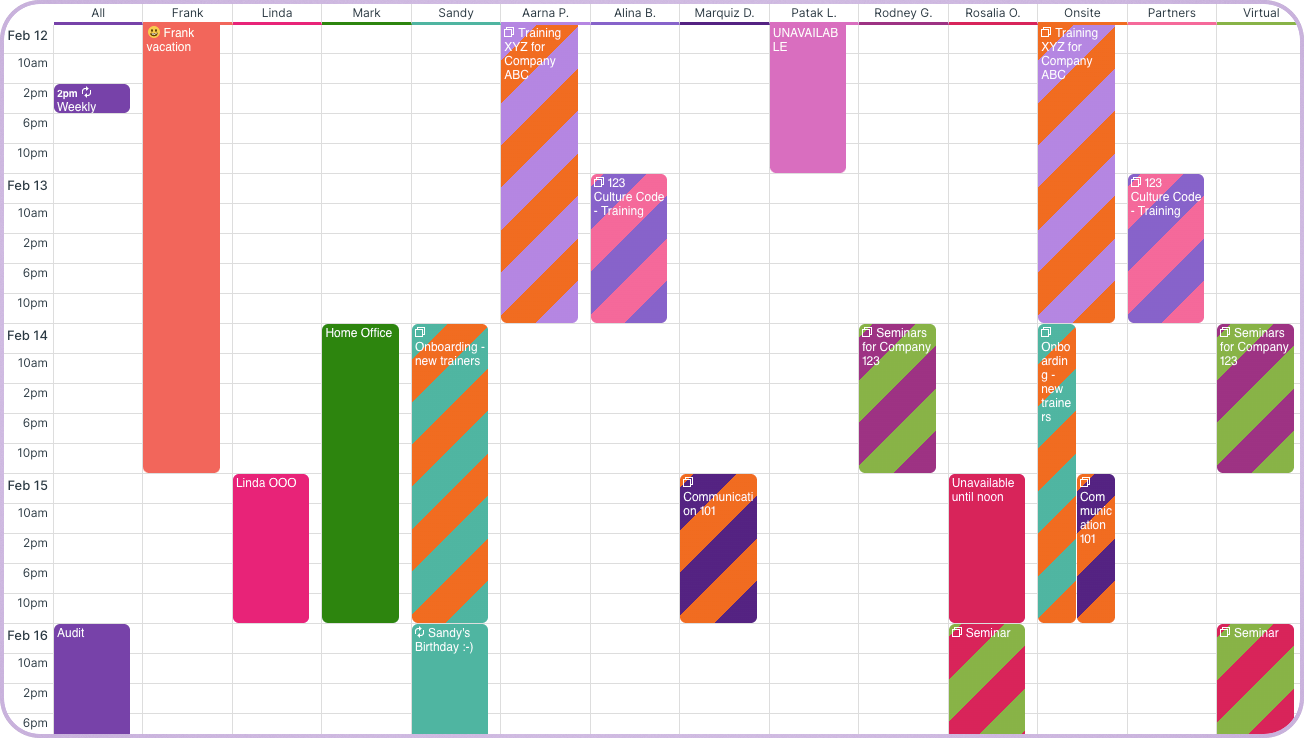
Click to enlarge: Scheduler view shows each trainer’s availability along with sessions side-by-side.
A shared calendar connects trainers and training sessions in one structured system. Each trainer’s availability and each session’s requirements are visible together, so assignments can be made quickly and accurately.
- Trainers are represented as sub-calendars, so assigning a trainer to a session instantly reflects on their schedule and prevents overlapping bookings.
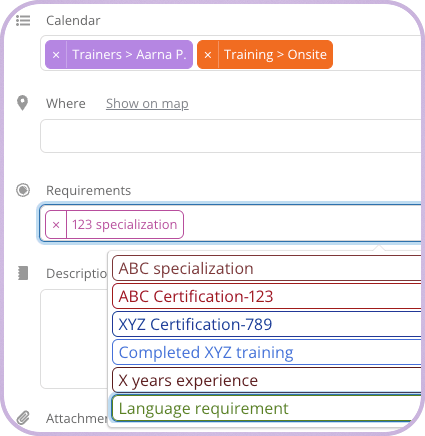
- A custom choice field is used to tag each session with any needs or requirements. This field can be used in tandem with a built-in system to track trainer qualifications.

Click to enlarge: A custom choice field can be used to designate requirements for any session.
- Scheduler view displays trainers side by side, allowing the coordinator to compare availability and make assignments without switching between tools.
- Filters are applied to focus on specific requirements, programs, or trainers, helping coordinators match session needs with the right personnel quickly.
- Role-based access ensures coordinators can manage assignments while trainers can view their schedules independently.
This structure turns scheduling into a clear, repeatable process instead of a manual coordination effort.
How to set up a workforce training calendar
Once the calendar is set up, scheduling trainers becomes a simple, consistent workflow. Each session, assignment, and qualification is captured in one place, so coordinators can manage the full schedule without relying on external tools.
Mini-guide
- Set up the sub-calendar structure:
- Create sub-calendars for each trainer and organize them in a folder for easy visibility.
- Add sub-calendars for training programs, session types, or locations as needed.
- Create a custom choice field to track session requirements; make it consistent across all events.
- Schedule training sessions as events, including time, location, and all necessary information. Upload any needed documents right to the event.
- Assign trainers to sessions by adding the session to their sub-calendar; automatically prevent overlaps to avoid double-bookings.
- Use Scheduler view to compare trainer availability side by side and make assignment decisions quickly.
- Apply filters to sort sessions by need and see trainers by availability.
- Set up custom access so coordinators can manage schedules and trainers can view their own assignments.
Simplify trainer scheduling and coordination
When you manage trainer availability, qualifications, and schedules in one place, coordination gets easier. Assignments rely on up-to-date information, so conflicts get resolved before they disrupt operations. This leads to smoother scheduling and more reliable training across programs and locations.
Create a Teamup calendar for your organization or explore a live demo to see how trainer scheduling can be streamlined.
Related resources