When you’re managing bookings in tight increments, standard calendar views usually aren’t precise enough. But Teamup’s Scheduler view is built for this kind of task. Each resource is displayed in its own column, so availability is instantly visible and clearly organized. Instead of scanning through overlapping events or switching between calendars, schedulers can compare time slots side by side and make decisions quickly. And because the time resolution can be adjusted, it works just as well for tightly packed, short-term bookings as it does for longer sessions.
How Scheduler view works
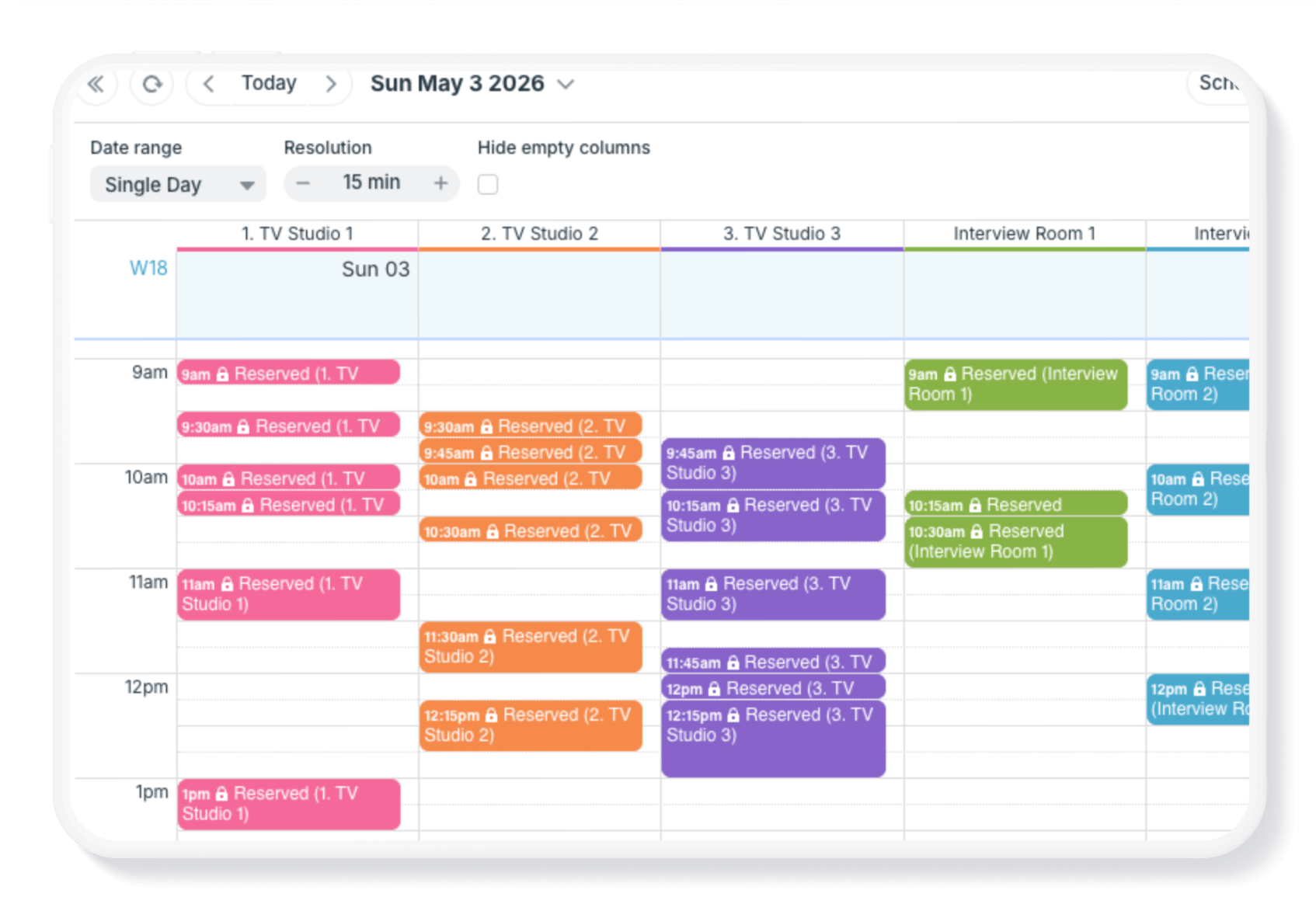
In Scheduler view, each sub-calendar is shown in its own column, with events shown side-by-side. Toggling a sub-calendar “off” from view will hide its column. Toggle it back on to see it again.
Adjustable resolution makes granular bookings easy. Set the resolution in time increments of 5, 10, or 15 minutes (and up) to see clear differentiation between each booking.
The date range is adjustable, as well. Focus on a single day, or scroll through multiple days or weeks at a time.
Example: Tightly packed media bookings

Click to enlarge: Media bookings for WEF “Summer Davos” conference. Media professionals can quickly spot an opening and reserve their time.
An ongoing, real-world example: Teamup is the calendar solution for multiple WEF events, allowing media organizations to self-book interview rooms. Scheduler view helps with streamlining the complex operation and easing coordination demand.
Media professionals can view all availability over the event duration (e.g. 3 days). With bookings shown side-by-side, it’s easy to spot an opening and make a reservation. Customized access keeps the details of other bookings private, so each organization can view and modify only their own reserved spots.
Keep tight booking schedules clear and manageable
When bookings are short, frequent, and constantly changing, visibility matters more than anything else. Scheduler view makes it easy to compare availability across resources, spot openings quickly, and assign time slots without second-guessing. Whether it’s media bookings, shared equipment, or appointment-based work, everything stays organized in one place with the level of detail needed for precise scheduling. Try Teamup and see how Scheduler view can make it easier to manage tightly packed schedules with confidence.
Related resources