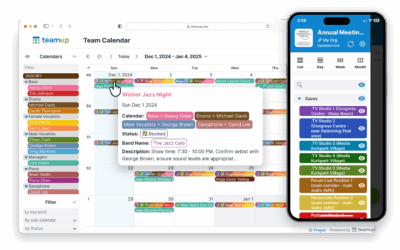
Use event signups to get an accurate headcount, set a limit on the number of participants, and collect participant information for follow-up. It’s easy.
Event signups are a built-in, powerful feature on Teamup calendars. If signups are enabled, people can sign up for an event with their name and/or email address. The event organizer(s) can easily see who has signed up.
How to enable signups
Enabling signups on events is a quick process.
Here’s how:
▶️ Configure Default Settings for Event Signups
You can enable signups by default and set defaults for the signup deadline and maximum number of signups permitted. These defaults can always be changed for any individual event.
When choosing who can view event signups, you can choose between All users or Users with modify permission. If you choose All users, email addresses of participants will be automatically hidden on the signup list, which will show at the bottom of the event editor/viewer, and on the event page.
See also: Event Signups on the Teamup App
Collect signups in one place
Many organizations and groups use Teamup for community calendars. Some of these calendars are available only to group members, and some are public-facing. In many cases, multiple organizations share a calendar so that community members can see all the area events in one place.
The signup feature makes it easier for event organizers to get an accurate idea of interest or limit the number of participants.
Enable Signup on any event, set a deadline, and set a maximum number if space is limited. Or, if you have plenty of room but want to have a headcount in order to prepare adequate materials, food, or other supplies, don’t set a maximum number but do require a deadline.
Participants can enter a name, an email address, or both to signup for an event. In order to prevent duplicate signups, the email address must be unique. If only a name is used, the name must be unique.
Manage the number of participants
Many Teamup users have found that their Teamup calendar works well as a simple booking system for workshops, classes, seminars, and training sessions. In most of these scenarios, it’s important to know how many people want to participate. In many cases, it’s key to be able to limit the number of participants per event.
Create the event for your workshop or class, then enable Signups and set the deadline, giving yourself enough time to make arrangements or adjust logistics as needed. Then, if needed, set the maximum number to limit signups to what you can accommodate.
Easily promote your workshop by sharing the event as a page across all your social media platforms or to an email list.
Interested people can signup from the event page, and you can get notifications when anyone signups. Set up your Notifications to include ‘All changes’ to receive an email when someone signs up.
Gather participant contact information
If you host an event and want to communicate with the participants afterward, you can do so with the information gathered via the event signups. As the event organizer, you can always see a list of event signups on the event itself. You can also export signups from an individual event. The signup information will download in standard .csv format, so you can easily sort and work with it as needed.
Related resources: