Restaurants and bars often host live music, themed nights, trivia events, and holiday parties that attract guests. Promoting these events clearly is just as important as organizing them internally. A public-facing calendar makes it easy to display upcoming events with automatically updated details that customers can check anytime.
The Teamup solution: An appealing, visual, public-facing calendar view that includes only selected events and stays updated automatically. The calendar can be embedded on a website and accessed via mobile on the Teamup app, so guests can check event info anywhere.
Why restaurants need a synced public events calendar
Restaurants and bars typically schedule events alongside many internal details such as staffing assignments, setup timing, or vendor coordination. 👉 Here’s how an operational calendar for a busy restaurant can keep everything aligned.
While all those details are essential for operations, they’re not mean to share with customers. So there’s a gap between what restaurants need to include on a calendar to keep everything running smoothly, and what they want to share with customers to promote special events. Often, the way managers handle this gap is by keeping everything separate. The calendar is used for operations, only. Special event info is shared in separate social media posts and updates on the restaurant website. That approach does prevent guests from seeing internal planning info, but it also creates another layer of work for managers and can lead to poor guest experiences:
- Each special event announcement or post has to be created and shared manually.
- If a detail changes, that means manual updates wherever the post was shared. Promoting events quickly becomes a chore.
- If a post isn’t updated, guests end up working from out-dated information, which creates a bad experience.
- But if events aren’t shared, people don’t know they’re happening which can lead to poor attendance and high operational cost.
Busy restaurants need a synced public events calendar to promote what’s happening and draw in guests. But they need to ensure that it doesn’t add manual work, always has accurate information, and never reveals internal planning details. Here’s how it can be done with Teamup.
A secure, updated, visual events calendar for guests
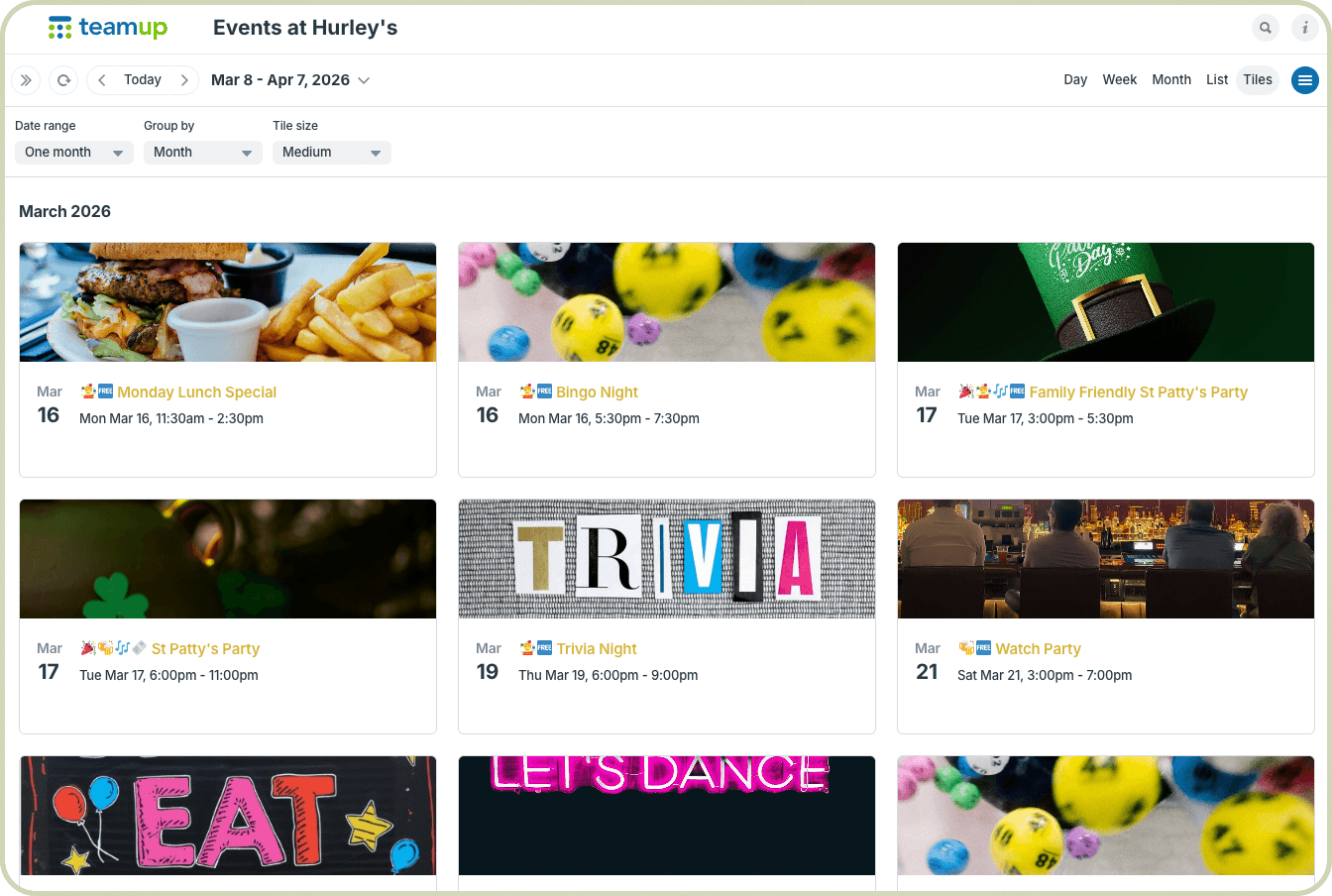
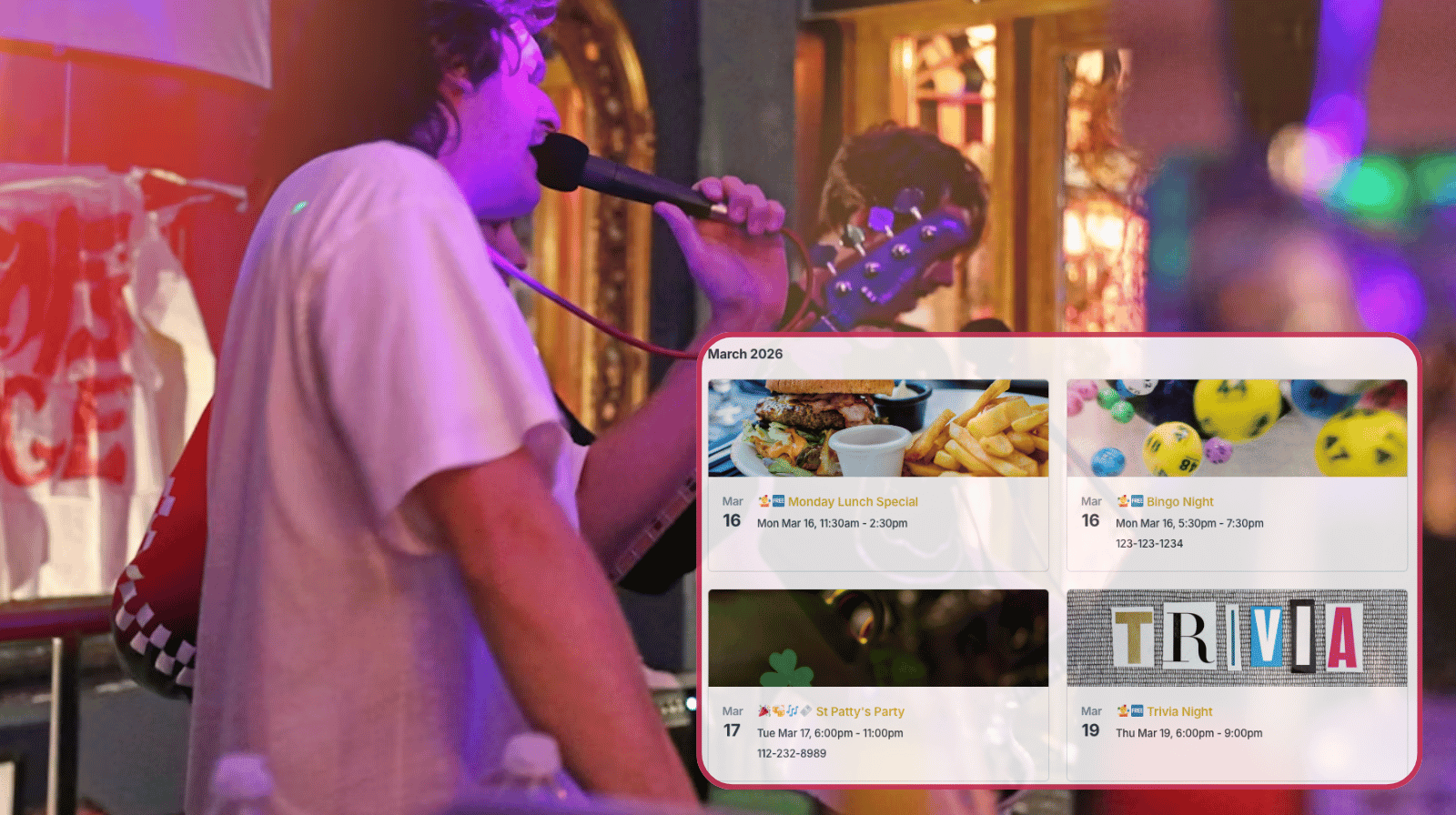
Click to enlarge: Share a filtered view of only special events displayed in an appealing visual layout.
Here’s the solution: A dedicated public-facing sub-calendar that syncs directly from the restaurant’s operational calendar, but contains only the events (and event details) meant for guests.
The operational calendar stays separate, but special events feed into the public events calendar. Guests can view the events calendar on the restaurant’s website or on mobile with a simple, secure calendar link.
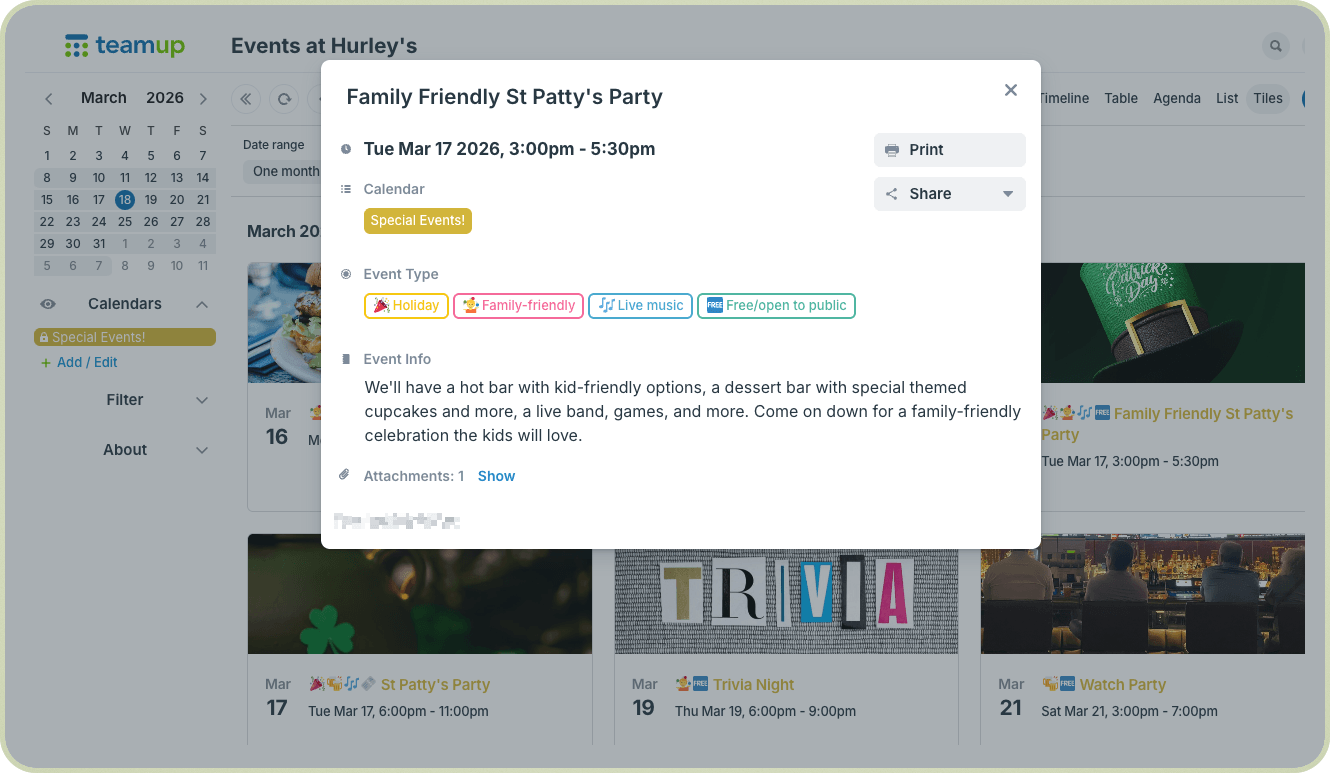
The layout is visually appealing, which makes events even more exciting. The key details that guests need are there, for each event, but internal planning notes are not.
Best of all: If the event time, date, or shared details are changed, those changes sync right to the public calendar. Events stay updated automatically. Guests always have the latest info about special events without extra time spent on manual updates.
How it works
Use one calendar for internal event planning and a separate calendar for the public-facing view. This keeps your internal scheduling details private while automatically feeding approved event information into a clean calendar you can share or embed on your website.
- Organize public events on your operational calendar
Add all public-facing events to a dedicated Special Events sub-calendar within your main restaurant calendar. Keep private bookings, reservations, and internal planning items on other sub-calendars so they are not included in the public view. - Create a field for public event details
On the operational calendar, add a formatted text custom field such as Event Info. Use this field for the details you want guests to see, such as featured menu items, entertainment, or ticket information. You can also create a custom choice field for event type or other event options you want to share publicly. - Copy the feed link for the Special Events sub-calendar
Get the iCalendar feed link for the Special Events sub-calendar. This is the connection that will send approved event entries into your public calendar. - Create a separate public events calendar
Set up a new Teamup calendar to serve as your public events calendar. This calendar will be used only for the guest-facing version of your events. - Match the custom field setup
On the public calendar, create a custom field with the exact same name as the one on your operational calendar, such as Event Info. If you created a custom choice field on the operational calendar that you also want to share publicly, create a choice field that matches it exactly on the public calendar. This allows the event details to display properly when they feed in. - Hide fields you do not want to show publicly
On the public calendar, deactivate the Description field as well as any other event fields you do not want guests to see, such as Where, Comments, or Signups. Leave Attachments active so event images can appear. It’s necessary to deactivate the Description field to prevent custom field information from being fed into the description when events are imported. - Connect the two calendars
Create an inbound iCalendar feed on the public calendar and paste in the iCalendar link from the Special Events sub-calendar. This pulls approved events into the public-facing calendar automatically. - Add special events as usual
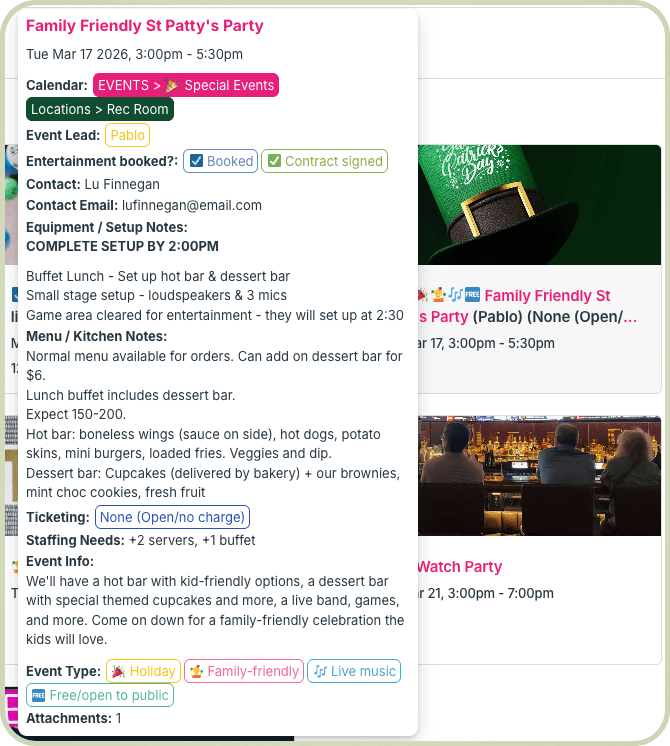
On the operational calendar, create event entries the way your team normally does. For any event you want to share publicly, assign it to the Special Events sub-calendar, upload an image in Attachments, and add the guest-facing details in the Event Info field.
Click to enlarge: All the internal planning details are organized and visible on the restaurant’s operational calendar.
- Share a clean public view
Set the public calendar’s default view to Tiles view for a gorgeous visual layout. The public calendar will refresh periodically and display only the information you want guests to see: the date, time, image, and Event Info content. Internal notes, planning details, and other private fields stay out of the public view.Click to enlarge: The same event on the public special events calendar shows only the details guests should see.
Embed the event calendar on the restaurant website
Once the public-facing events calendar is ready, you can embed it directly on the restaurant’s website. Add a “Special Events” page and embed the calendar with a customized look and feel to match the restaurant’s branding and blend in seamlessly. Guests have a central event listing they can check anytime. Instead of updating event details in multiple places, staff simply update the calendar. The website display updates automatically.
Share synced, visually appealing events
A public calendar should do more than list dates: It should make events look inviting. After all, the point of sharing special events is to bring people in to enjoy them. With a public events calendar using Tiles view, each event has a cover image with the title and key details visible at a glance.
For restaurants and bars hosting entertainment, this visual layout is especially effective. A guest browsing the website can quickly spot events they’re interested in, see what’s on for the upcoming week, and start making plans. Because the calendar stays synced automatically, staff don’t have to update multiple systems or worry about outdated information circulating online.
Give it a try: Keep operations, staff, and events aligned, organize and manage events efficiently, and promote public special events seamlessly. Get started with a Teamup calendar and turn your event schedule into a dynamic event hub for your restaurant or bar.
Related resources
- Set up operations: Keep events, staff, and schedules aligned in busy restaurants and bars
- Here’s how to organize and manage special events efficiently
- ▶️ Embed a calendar on your website
- Learn more about displaying events visually with Tiles view
- Another example of this setup: Sharing automated status updates with clients