
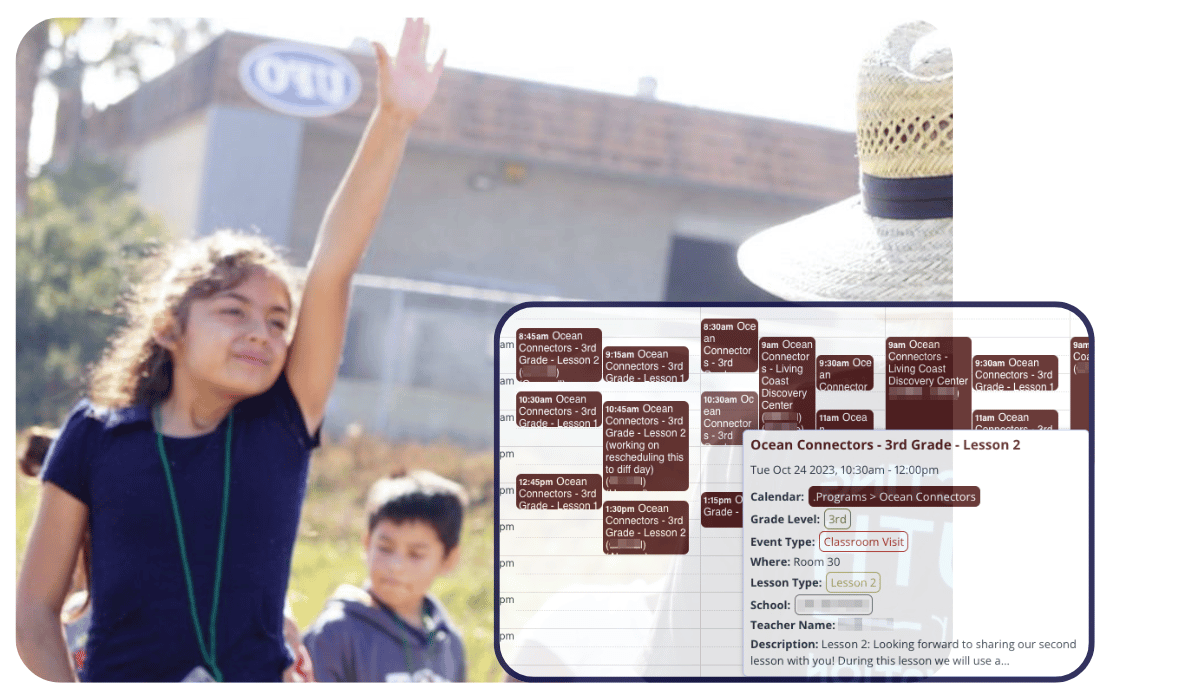
Education today often involves multiple educational partnerships. These partners in education help enrich learning and expand on what students receive in the classroom. But making it all happen isn’t easy.
We spoke with Janaira Quigley, Executive Director at Ocean Connectors and educational consultant. Skilled at building complex systems for better communication and operational efficiency, Janaira has been working with schools to build a program scheduling system. Here’s what she shared about using Teamup to coordinate education partners with schools and teachers.
The challenge: Coordinate educational programs across multiple schools and partner organizations while aligning with classroom schedules, bell schedules, and logistical constraints, without relying on fragmented communication or manual updates.
The solution: A structured Teamup calendar organized by schools, teachers, and partner organizations, with custom fields and customized access so each group sees only what they need while working from one shared system.
The challenge: Complex educational program scheduling
To bring partner offerings to the students, education program coordinators need to consider teachers’ schedule needs and other factors of school scheduling. Then they slot in the presentations, hands-on learning, field trips, and special activities. Educational partners and school districts need a reliable tool for scheduling programs and coordinating without adding more to their workload.
To use Teamup as an educational scheduling system, there are three main areas to consider:
- Creating a structure that serves all stakeholders.
- Optimizing the calendar for how it will be used.
- Setting up customized access for all stakeholders.
A structure that serves all stakeholders
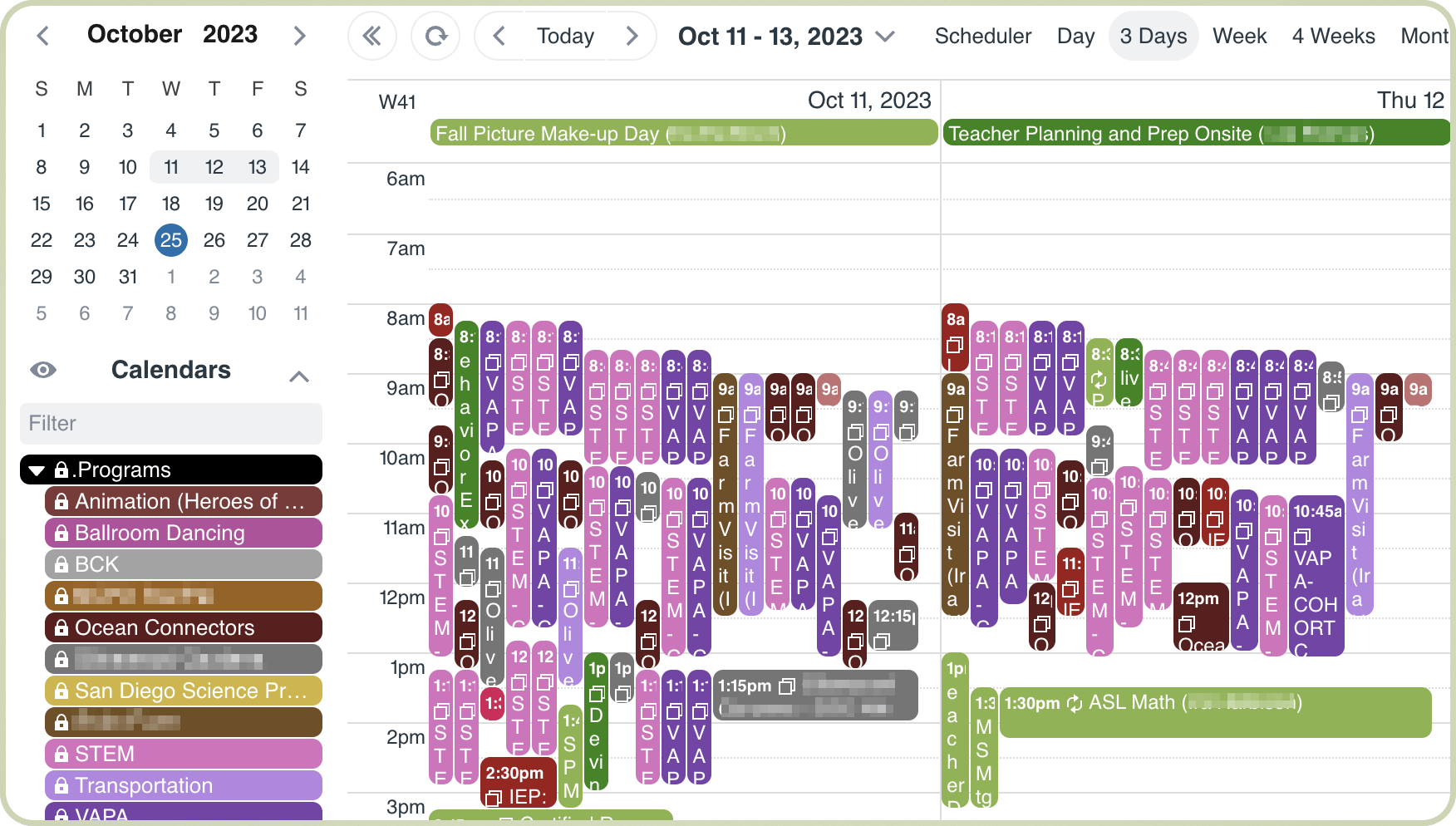
Click to enlarge: Bringing all the partner programs and school schedules into one place provides a high-level, comprehensive view for coordinators.
To start building out the framework for a scheduling system, start with a thorough understanding of the stakeholders. What are their needs? What are their expectations and restrictions? And what information do they need in a system for scheduling programs with educational partners?
Each scenario involving schools and educational partners will be a little different. However, the important commonality is that many stakeholders are involved. It’s important to work with the different groups and individuals as you start building a calendar structure.
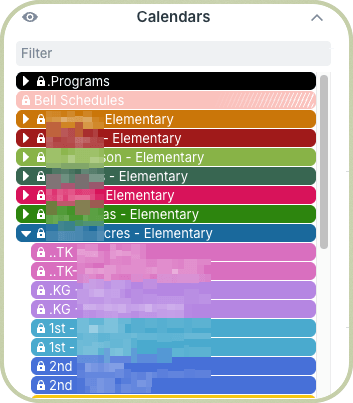
I started by creating a folder for our education partnership programs with a calendar for each program. Then I added a folder for each school with a calendar for each teacher within the school. Once that was done, I could start setting up individualized views, or access, for each stakeholder.
Scheduling a program means finding availability for all the relevant individuals and groups involved. It’s also important to think about schedule restrictions. For example, educational partner programs need to take the bell schedule of all the schools into consideration.
⚙️ Organizing stakeholder schedules
Each scenario is different. Here’s how Janaira set up her initial calendar to include all the stakeholders while keeping all the schedules organized:
- Educational Partners folder: Each partner organization has its own sub-calendar within this folder. Any scheduled events involving a partner organization will be on their calendar. Scheduling coordinators can easily toggle sub-calendars to see different scheduling views, such as all programs and events for a specific partner organization, or all programs scheduled for any organization over a certain time period.
- School folders: Each school has their own folder, with an individual sub-calendar for each teacher within the respective folder. This structure makes it easy to set up customized access (more details below) and to toggle calendars or entire folders to focus on one classroom or one school at a time.

- Schedule Restrictions folder: This folder contains the bell schedules of all schools in the district, so partner program coordinators can reference them. This helps them find the best slots for program activities and avoid conflicts with school schedules.
An optimized calendar for real-life use
We have a whole spectrum of people who are involved. Some prefer paper calendars, and some are quite tech savvy. So we need a system that’s workable for all these levels. Teamup is really easy to work with.
With the basic structure in place, you can now consider what else needs to be captured, added, or tweaked to make the scheduling system as useful as possible. To optimize well, Janaira stressed the importance of taking time to really understand how the stakeholders will be viewing and using the calendar:
- School staff include teachers, administrators, schedulers, and supervisors for each school in the district.
- Educational partners include the scheduling admin team (Janaira and her team), schedule coordinators and staff members for each organization.
- Other stakeholders for specific activities and programs may include facility managers, transportation supervisors, drivers, assistants, volunteers, parents, and so on.
⚙️ Considering information needs
- Examine needs and preferences: With this many stakeholders, there is a lot to consider. First, consider what information is needed by each person to succeed in their role. Then consider how the system can become as intuitive and user-friendly as possible for each person.
- Capture all the details: Janaira set up custom fields to capture all the scheduling dimensions. Not all the fields are relevant for all the events: for example, field trips require transportation, but in-class activities don’t. But some fields are relevant for any event, so they’re required.
- Make information visible: Stakeholders can filter by keywords or by custom fields to see what they need to see. For example, if a superintendent wants to see what’s going on with 3rd grade in November, it’s easy to do.
Optimizing the calendar means ensuring that every user can get the information they need easily. So, each scheduled program is created as a calendar event with detailed information. Custom fields capture key details such as:
- Partner organization and program
- School and teacher
- Grade level and lesson type
- Location and transportation needs
- Supplies or preparation requirements.
Some fields are required so important details are not missed. Others are included in event titles to make the schedule easier to scan. Attachments and notes are added directly to events so everyone can access what they need in context.
Some of these custom fields are required so we don’t forget to include the important information. Some fields are set to show in event titles so it’s easy to scan and see what’s happening. We use the event description to put in notes about what each program includes for the teachers. And we’ll upload any attachments so they have everything needed right there.
Customized access for every person
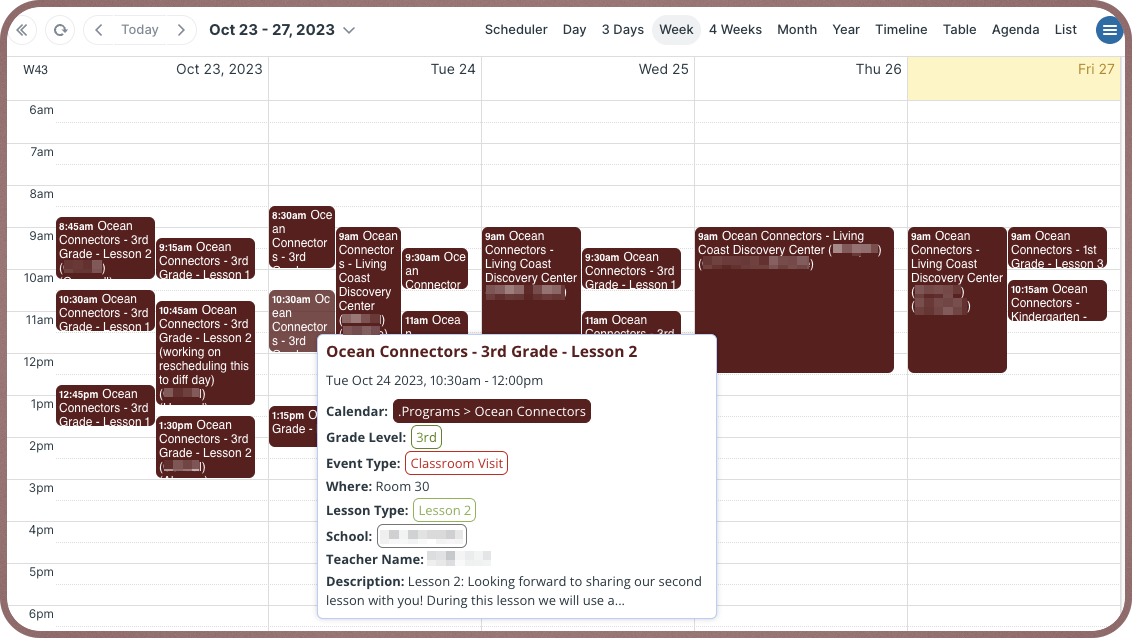
Click to enlarge: Each educational partner has access to only their own sub-calendar, which has all the information needed.
Customized calendar access is what makes the whole system work for each stakeholder.
Education partners only need to see the programs they have scheduled, for their own organizations. They don’t need to see all the information about other partner organizations. So each partner organization has access to see their own sub-calendar only. The custom fields hold all the information they need for each scheduled event.
Meanwhile, each school is given an access link which includes all the school sub-calendars. Each teacher also has calendar access that shows just their own sub-calendar. This way, admins or superintendents can get an overview of what’s happening across the whole school. Teachers can focus on their own classrooms.
⚙️ Customizing what’s visible
- Fine-tune the signal: The same calendar serves multiple groups, but each group sees only what is relevant to them:
- Educational partners see only their own programs.
- Teachers see only their classroom schedule.
- School administrators see a broader school-level view.
- Coordinators see the full system across all schools and partners.
- Bell schedules are visible only to those who need them for planning.
- Reduce the noise: With this much scheduling information, what you leave out is just as important as what you leave in. Unnecessary data is just noise. Noise is distracting and unhelpful. For example, while the bell schedules are important for the scheduling admin team, they’re unhelpful noise for the teachers and school coordinators. With customized access, the bell schedules are completely invisible for school staff.
A shared calendar for easier education scheduling
Teachers like being able to look at the whole month ahead and see what’s coming up. They can get a bird’s eye view and plan their weeks knowing what’s scheduled with different programs and activities.
With Teamup in place as a shared scheduling tool, coordinating between partners, teachers, and administrators becomes much easier. And everyone is aware of what’s happening.
Teachers can look ahead and understand what is coming up in their classrooms. Partners can schedule programs within real school constraints. Coordinators can manage the full schedule without chasing information across multiple tools.
For Janaira, it’s an ongoing effort that she continues to tweak and improve. So far, the feedback has been overwhelmingly positive.
I love platforms that intuitively make sense like Teamup. I could poke around and figure out what I was doing, and we’re tweaking as we go to make it work… If we can make teacher’s lives easier right now, we need to do it. Teamup has been a wonderful partner in helping us set this system up, being responsive and supporting each step along the way.
Many thanks to Janaira for sharing your story with us. We’re glad to be part of making things easier for schools, teachers, education program coordinators and partners.
Interested in trying Teamup for your own partner program or school district? Create your own Teamup calendar today, or start exploring with one of our live demo calendars.


