
Field service teams juggle many jobs at once. Work is spread across regions. Technicians have different skills and availability. Dispatchers need to see everything that’s happening, without losing track of who is working where.
The need: Dispatchers need a single view of all jobs and technicians, while still organizing work by region so assignments make sense on the ground.
The Teamup solution: A shared, visual calendar that shows the big picture and keeps technicians grouped by territory.
Why both the big picture and regional views matter
Dispatching without a full view creates blind spots.
For example, a dispatcher might assign a job without realizing technicians in the region are already booked solid. Another technician in a nearby region has availability, but they aren’t visible in the same view.
At the same time, assigning work without regional structure creates different problems. Jobs bounce between technicians who cover large areas. Travel time increases and work becomes inefficient.
Having both views matters because:
- Dispatchers can see how busy the entire team is before adding more work.
- Regional groupings show who is actually close enough to take a job.
- Load can be balanced across regions instead of overworking one area.
When this information is visual, it’s easier to scan. You can spot gaps, overloads, and patterns in seconds. Spreadsheets make you hunt for answers. A visual calendar shows them.
A shared calendar with regional structure
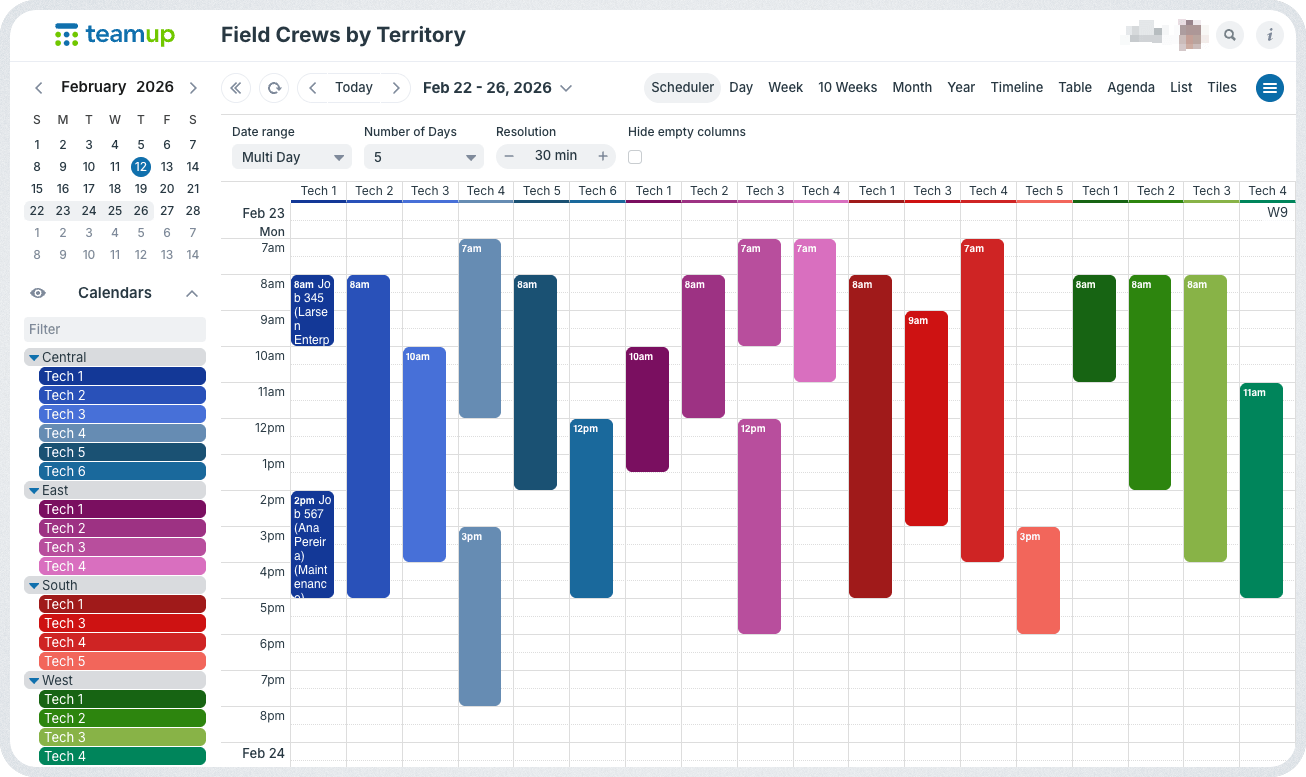
Click to enlarge: See all tech schedules in one overview, organized and color-coded by territory.
With Teamup, all jobs stay in one master calendar. But they’re organized in a way that provides regional structure.
Here’s how: Technicians are grouped into folders by region. Each technician has their own sub-calendar inside the appropriate folder. Dispatchers can look at the entire operation or focus on one region at a time.
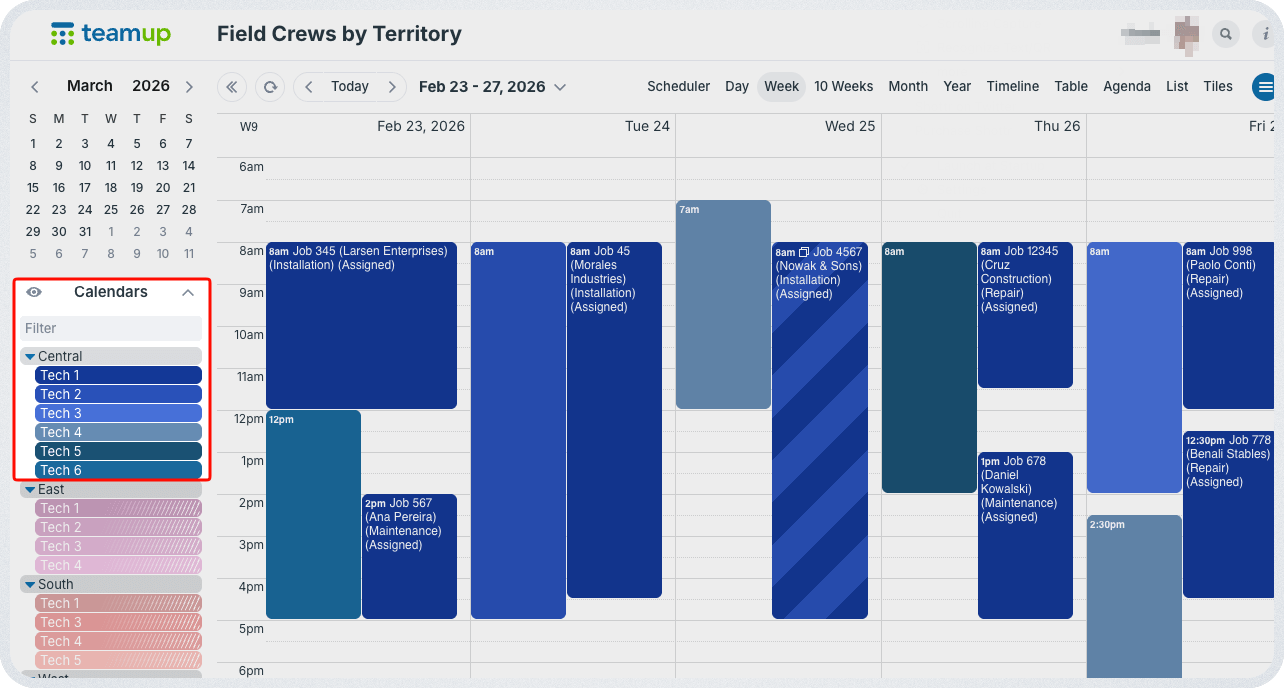
Click to enlarge: Toggle folders to view only techs within a region.
How it works
📍Mini-guide
- Create one master Teamup calendar for field service operations.
- Add one sub-calendar per technician, organized in folders for each service territory or region.
- Tip: Use similar colors for all the calendars in each region to provide easy visual cues when scanning the calendar.
- Turn on overlap prevention for technician calendars so one tech can’t be double-booked.
- Add custom fields for job type, status, and priority or job value so dispatch can filter quickly.
- Set access by role: Dispatchers can edit all sub-calendars, technicians can view their own events, and managers can view everything.
- Toggle folders to switch between the big-picture view (all regions) and a region-only view (just one folder’s calendars).
Clearer scheduling and better decisions
With this setup, dispatchers can see the full workload before assigning new jobs. They can focus on one region when needed, or zoom out to check balance across all regions.
The jobs are organized visually, for quick scanning and fast availability comparison. All the calendar data is organized, searchable, and useful. The same data can be used later to compare regions, spot trends, and decide where more technicians are needed.
Related resources
- Learn how to simplify multi-branch coordination
- Set up cross-team or cross-region visibility with safe information sharing
- Here’s a smart approach to streamline contractor scheduling
- Avoid resource conflicts with a combined staff and equipment calendar
- How to let team members know who else is on the job
- Let team members update status and document work without editing events
When field crew schedules live in one visual system, dispatchers stop guessing. They can see who’s busy, who’s nearby, and where work is piling up. Try setting up a regional dispatch calendar in Teamup, or explore more features in a live demo calendar.