
A weekend retreat involves a lot of details: session schedules, locations, meals, free time, and activities. Whether it’s a company offsite, wellness retreat, or leadership workshop, the folks attending want to know what’s on the agenda both before they arrive and during the retreat itself.
The challenge: Provide up-to-date retreat details for all attendees without resorting to printed PDFs, long email chains, or clumsy corporate calendars.
The Teamup solution: Secure, customized schedule access via the Teamup app. Visually appealing Tiles view highlights each event while providing easy access to always-up-to-date information.
What guests need to know for weekend retreats
Retreat schedules are often more detailed than they seem. There can be a lot packed into two or three days:
- Multiple events per day (sessions, meals, activities, breaks).
- Location details and notes for each event.
- Visual context, such as themes, speakers, or activity types.
- Last-minute adjustments due to weather, travel, or group needs.
Guests want to know what to expect before the retreat. They often need to consider options, such as meal or activity preferences, and provide their choice for each one. During the retreat, guests need easy, on-the-go access to event times and other details.
Share an accessible and secure retreat schedule
With Teamup, it’s simple to share a retreat agenda with guests, without giving up control or scrambling to print updated PDFs when something changes. With customized access settings, you can generate a secure, read-only link that shows attendees exactly what they need, and nothing more. Then share that secure link with guests. There’s no login required. Guests just download the Teamup app and paste in the calendar link for instant access to the current schedule. If plans change, the update appears immediately. No follow-up emails. No version confusion.
Tip: When the retreat is over, delete the link so the schedule is no longer accessible to guests but remains on the calendar for archival purposes.
Make each activity clear and inviting with Tiles view
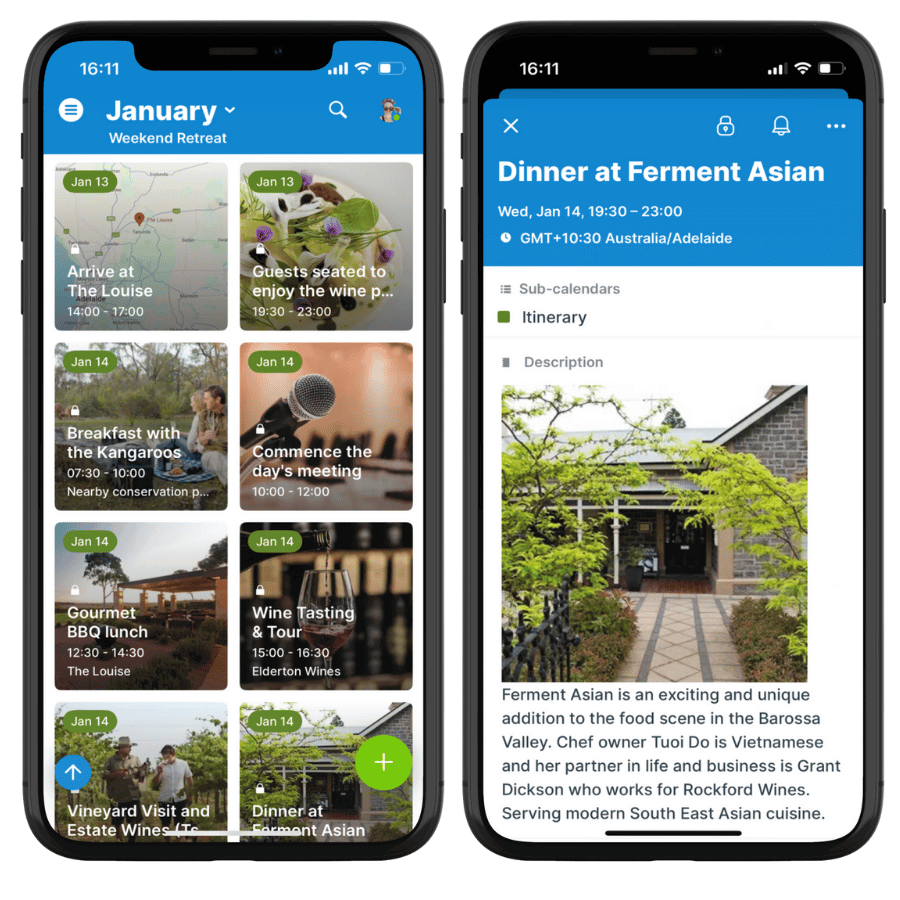
For retreat attendees, visual clarity matters just as much as accuracy. That’s where Tiles view in the Teamup app shines. Instead of a dense list, guests scroll through the weekend schedule and see each retreat event as a visual card. Each event card displays an image with the event title, time, and location clearly visible. The result feels less like a spreadsheet and more like a curated retreat itinerary. Attendees can quickly scan what’s coming up and feel oriented throughout the weekend.
Tip: Choose images that clearly reflect each event (nature tour, wine tasting, dinner, workshop) so guests recognize activities at a glance.
Create an interactive agenda with signups and comments
Read-only access ensures that guests can’t make changes to events, but they’re still seeing all the details. In some cases, guest need to provide input or feedback. Some fields can be interactive to collect this information, without losing the read-only safety net.
- Event signups: Enable signups to let read-only viewers register for different events or sessions. Set a signup deadline and maximum number if needed.
- Event comments: Enable comments for read-only users to let guests choose from menu options, indicate dietary needs, coordinate transportation, make special requests, or provide feedback.
These elements stay attached to the relevant event, so organizers don’t have to shuffle different documents to keep track of important requests.
Tip: Encourage guests use the uploading option in the comments of any event to create a live, shared “photo journal” that’s instantly accessible for everyone.
A better way to guide the retreat experience
When the weekend retreat agenda is easy to access, visually organized, and securely shared, the entire retreat runs more smoothly. Guests can easily keep track of what’s happening and settle in to enjoy a meaningful experience.
- One source of truth: Everyone sees the same, up-to-date schedule at all times.
- Secure sharing: Read-only access prevents problems while keeping guests informed.
- Reduced questions: Clear event descriptions and visuals answer common “when” and “where” questions.
- Mobile-friendly access: Guests can check the agenda on their phones throughout the weekend.
- More polished experience: A visually appealing schedule sets the tone and reflects the care put into planning the retreat.
A weekend retreat should feel intentional and well-paced, not confusing or disorganized. Share a secure, visually engaging weekend schedule that keeps everyone informed and aligned before the retreat begins and throughout the entire weekend.
Related resources
- How to Use the Teamup App (iOS, Android)
- Tiles View: Visual Event Display
- How to manage workshop registrations without extra tools
- How to share events and keep people updated
- Interactive demo: Event signups
With Teamup, retreat planning becomes clearer, calmer, and easier to manage. Get started with your own calendar today.