

Creating a workout program is only part of the coaching process. Clients also need a simple way to follow the program between sessions, review assignments, and stay connected to their trainer. When workout plans are delivered through PDFs, emails, or messages, important details are easy to overlook. A personalized client calendar gives each client a clear, mobile-friendly view of their training schedule and an easy way to share progress as they work through the program.
The need: Fitness trainers need a simple way to share training schedules, workout assignments, and program updates with clients while keeping communication organized between sessions.
The Teamup solution: Teamup allows trainers to share personalized client calendars that clients can access anywhere, view in a visual schedule format, and use to log workout progress directly on scheduled workouts.
Share a personalized client schedule
Many trainers work with multiple clients at once, each following a different program. Sending workout plans through email or messaging apps often creates confusion when schedules change or new assignments are added. With Teamup, trainers can organize and track client programs in one calendar, and each client can have access to their own personalized training calendar. Clients see only their own schedule, including training sessions, at-home workouts, assessments, and program milestones. Trainers can update the calendar at any time, and clients automatically see the latest version.
Give clients a visual program view
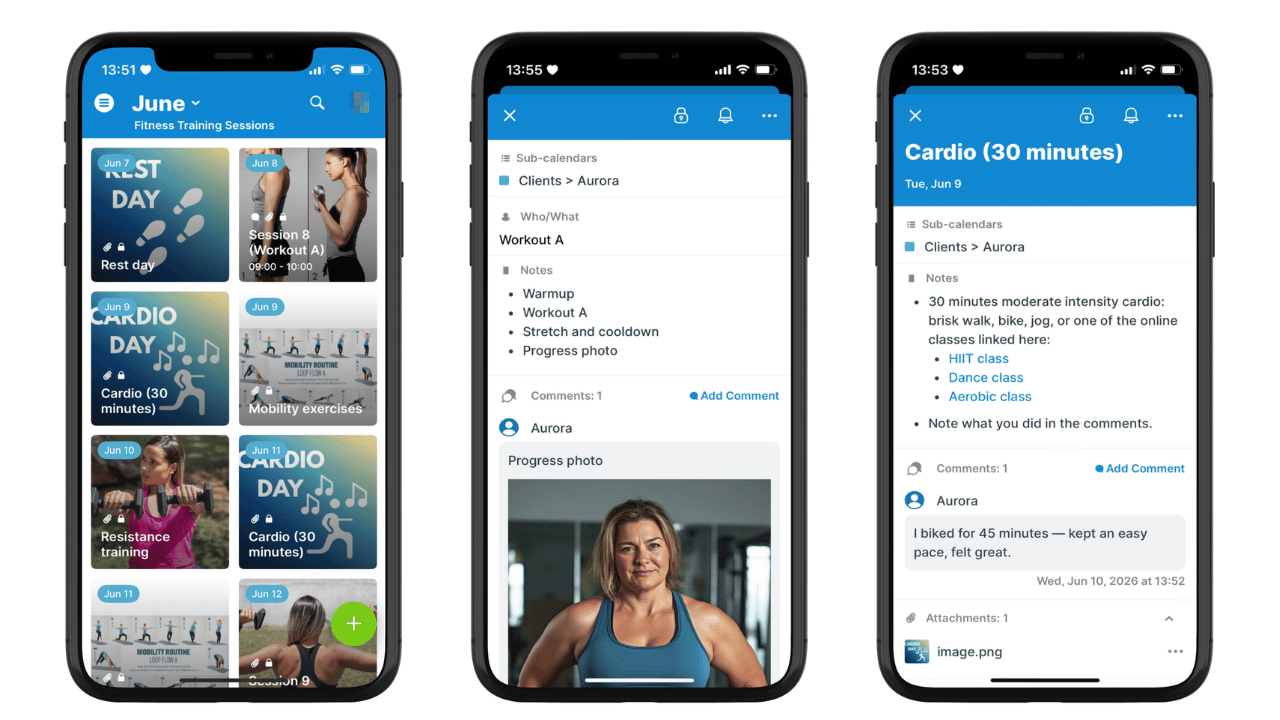
Click to enlarge: Tiles view provides a visual layout of each client’s weekly schedule. Clients can use comments to upload photos, track progress, and log activity. If desired, trainers can be notified whenever a client adds a comment.
Clients are more likely to follow a program when they can quickly understand what is scheduled and what comes next. Teamup’s Tiles view displays workouts and sessions in a visual, easy-to-scan layout that looks great on mobile devices.
- Clients have secure, customized access to only their own schedule: Upcoming workouts, training sessions, recovery days, and milestones.
- Training plans are presented in a clear visual calendar, making programs easier to follow than long documents or exercise lists.
- Each session or workout has all the details needed: Trainer’s notes, video links, instructions, and images are right there for easy reference.
- Clients can view their schedule and access materials anywhere through the Teamup app: In the gym, at home, or while traveling.
Track progress through comments
Staying connected between sessions is often one of the biggest challenges in personal training. Trainers want to know how workouts are going, and clients need an easy way to report progress or ask questions.
Each workout event has a Comments field, where clients can record completed exercises, note how a workout felt, share results, upload photos, or ask follow-up questions. Comments are automatically time-stamped and synced, so trainers can review updates as clients add them. This creates a simple progress record that stays connected to the workout. No need for separate text threads or emails.
🔍 Event Comments are a unique event field that allow read-only users to interact with events in a strictly limited way: They can use comments, but cannot change anything else about the event. Comments have text formatting and allow image/file uploads, and are automatically time-stamped. Here’s how to set this up.
Keep plans and updates organized
When workout schedules, instructions, and progress updates all live in the same place, communication becomes much simpler. Clients always know where to find their next assignment, and their questions, updates, and progress photos stay with their workouts. Trainers can review completed workouts and keep track of ongoing progress in the same place where they plan upcoming sessions. The calendar is searchable and has built-in filters, along with helpful layouts like Table view for reviewing data and even generating reports.
Instead of juggling multiple tools, both trainer and client work from the same shared program calendar. The trainer has access to everything, while the client has a customized view that lets them see only their own schedule.
Create a better client experience
A personalized training calendar helps clients stay engaged with their program between sessions. Mobile access, visual schedules, and built-in progress tracking make it easier to follow workouts and maintain communication without extra administrative work.
⚙️ Quick setup guide
- Create a dedicated sub-calendar for each client.
- Configure event comments so clients can log workout results, ask questions, and share progress updates.
- Share customized calendar access: Each client gets read-only permission to their own sub-calendar only.
- Encourage clients to use the Teamup app with Tiles view for a visual, easy-to-follow schedule.
By giving every client their own calendar, trainers can deliver a more organized coaching experience while keeping workout schedules, instructions, and progress updates connected in one place. Create your own Teamup training calendar and give clients a better way to stay on track.
Related resources
- Organize Client Workout Programs in One Training Calendar
- A Shared Calendar to Manage Gym Staff Scheduling
- Similar setup, different use case: How Real Estate Agents Can Share a Visual Showing Schedule with Clients
- More about Tiles view: A Picture Is Worth a Thousand Words: Experience Tiles View
- More about the Teamup apps: Teamup Mobile Apps
- ▶️ Interactive demo: Configure and Manage Event Comments
- ▶️ Interative demo: How to Use Event Comments


