Schools rely on shared classrooms, labs, and spaces throughout the day. Teachers and staff need a clear way to see availability and book spaces without creating conflicts.
The need: Educators and staff need a reliable way to see which classrooms and shared spaces are available so they can book what they need without creating scheduling conflicts.
The Teamup solution: A shared calendar that organizes each room as its own color-coded calendar, giving teachers and staff a clear, real-time view of availability and preventing double-bookings.
When shared spaces are booked without a clear system
In many schools, shared classrooms, labs, and other spaces are an important part of each day’s program. Teachers have their regular classroom and class schedules, but those other spaces are also essential. There are special projects, lab sessions, partner programs, testing blocks, after-school programs, tutoring sessions, and extracurricular clubs that need to be scheduled somewhere.
Since each week has different activities, tracking room availability and booking room usage is not a once-and-done thing. Instead, it’s a fluctuating set of needs which specific time constraints. Managing it all takes clear organization and communication.
Many schools still rely on spreadsheets or informal systems to show space availability and manage booking requests. But these tools don’t clearly show availability and often result in conflicts. It’s just not easy for staff to spot overlaps or gaps in the schedule. And version control can be a problem, too. One person might send an email to reserve a room, while another person sends a text or stops by the office. If the requests overlap, admin may not notice until much later when the requests get added to the spreadsheet.
It’s much easier for everyone to set up a shared, visual calendar that clearly shows room availability, keeps it updated in real-time, and prevents conflicts from happening.
A clear, shared view of every classroom and space
With Teamup, each classroom, lab, or shared space becomes its own sub-calendar. They’re color-coded and can be organized in folders. The structure makes availability easy to see at a glance. Instead of checking a spreadsheet or asking around, teachers and other staff can check the calendar to see which rooms are available and which are already booked.
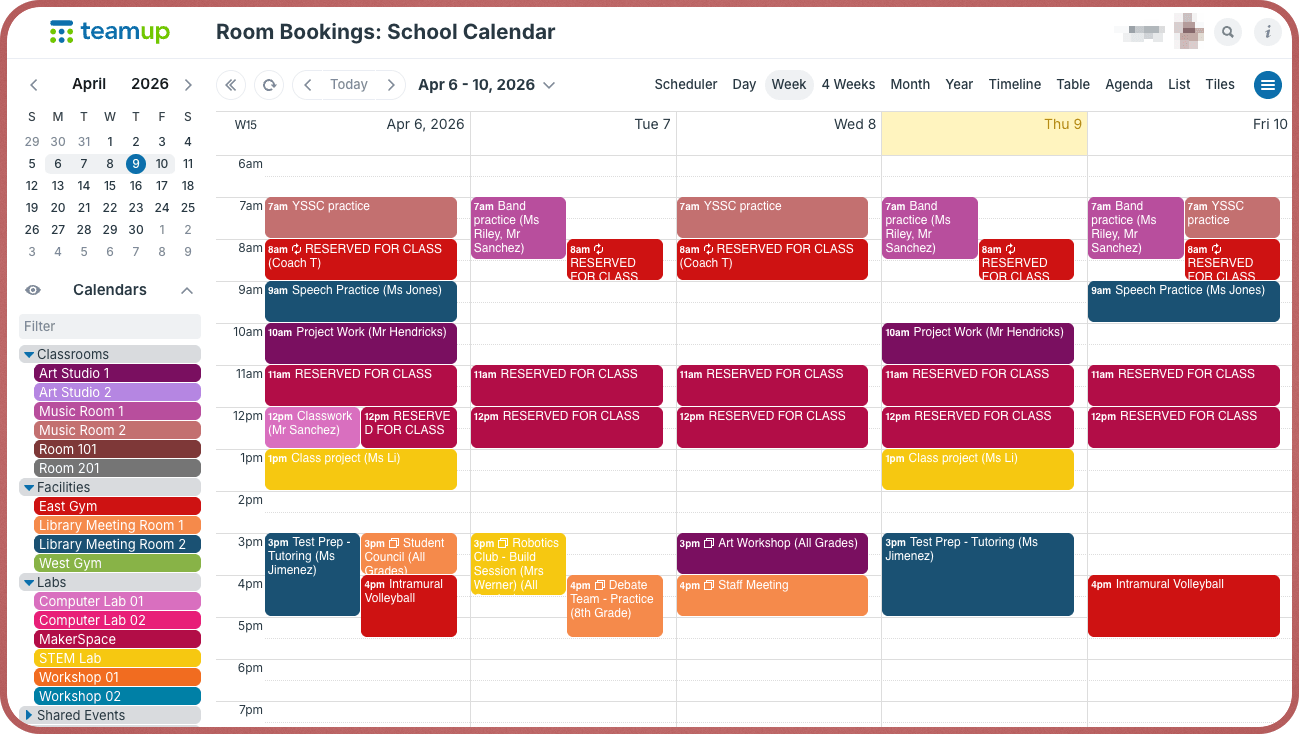
Click to enlarge: Each shared space and bookable classroom has its own sub-calendar, set to automatically prevent overlapping events to prevent double-bookings.
The visual layout makes conflicts obvious. If someone already reserved a room, the calendar blocks that time clearly. There’s no guessing or back-and-forth.
A teacher planning a session can check the calendar to find an open time slot for the lab, without having to wait on a reply from the office about when it’s open. To make the setup even more efficient, set up secure self-booking so teachers can make their own reservations right on the calendar.
Flexible self-booking with clear boundaries
Instead of routing every request through admin staff, set up the shared classroom available calendar so teachers can self-book room usage. This removes the back-and-forth of emails or approval requests and keeps scheduling moving without delays. At the same time, clear boundaries keep the system organized and secure.
With Teamup, you can control exactly who can book which spaces and what they’re allowed to change:
- Teachers can book only the classrooms or spaces they’re given permission to book.
- Each person can create and update their own bookings without affecting others.
- Department heads and admin staff keep full visibility (and control) of usage across all spaces.
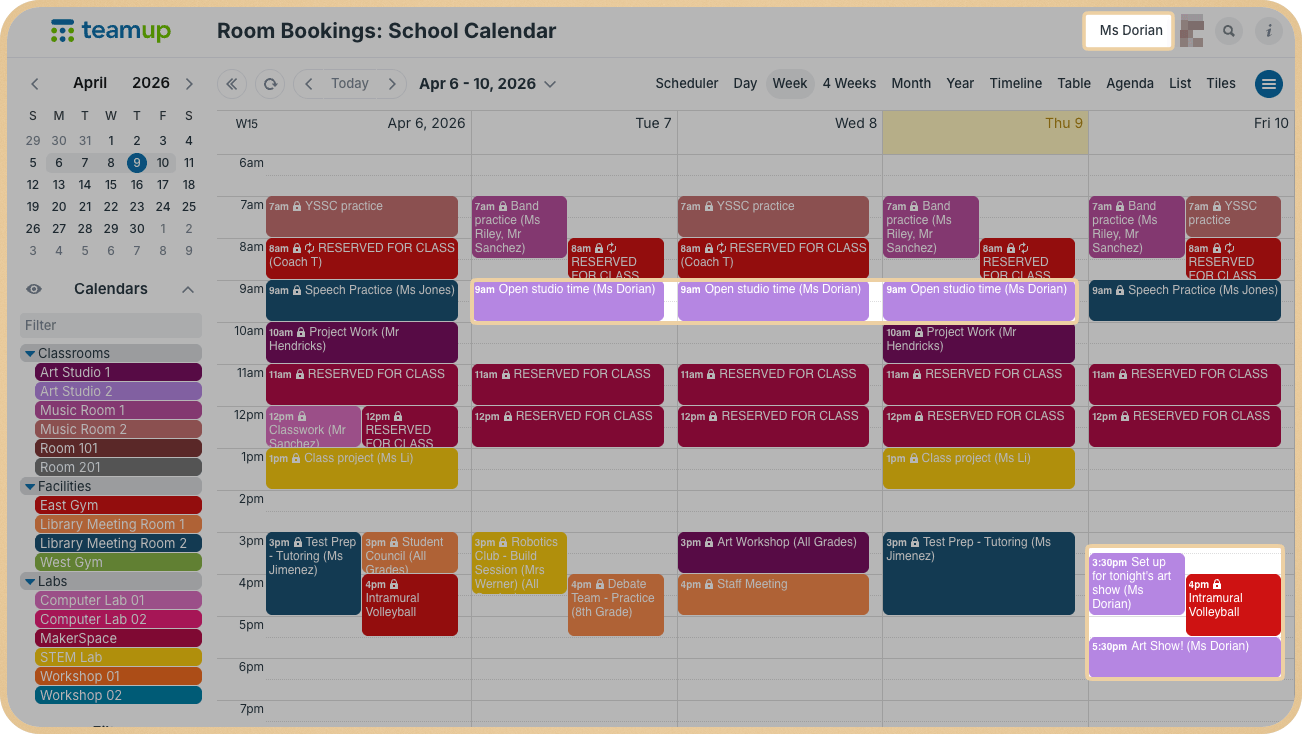
Click to enlarge: This teacher’s customized access allows her to add and modify her own bookings, but she cannot change those made by other teachers or admin staff. The lock icon indicates that an event is read-only.
With individually customized access and modify-my-events permission, each staff member works within their own scope. No one can overwrite or edit someone else’s booking, which prevents accidental changes and protects the schedule. And double-bookings are automatically prevented: Each sub-calendar can be set to disallow overlapping events. Once a room is booked, that time slot is no longer available, so conflicts never occur in the first place.
This approach gives teachers the flexibility to schedule what they need, while reducing administrative workload and keeping the entire system controlled and reliable.
How it works
Color-coding helps distinguish rooms. Filters let users focus only on the spaces they need. Customized access ensures that each person can manage their own bookings without making changes to someone else’s reserved use.
📌 Mini-guide
- Create a sub-calendar for each classroom, lab, or shared space.
- Assign colors to each space for quick visual identification
- Organize spaces into folders (e.g., Classrooms, Labs, Shared Facilities).
- Set each calendar to disallow overlapping events to prevent double-booking.
- Add custom fields to capture any key details like setup, equipment use, curriculum tie-in, etc.
- Give each teacher customized access with modify-my-events permission to the appropriate sub-calendars.
- Everyone can access the calendar securely on a browser or using the Teamup app.
Keep scheduling simple and conflict-free
When schools manage all classrooms and shared spaces in one calendar, everyone works from the same information. Teachers can book what they need without delays. Admin staff spend less time responding to requests and resolving conflicts, while still maintaining full visibility and control. The result is a smoother scheduling process and better use of school spaces throughout the day.
Create your own Teamup calendar and simplify how your school manages shared spaces.