Long-term planning takes many forms. You might run an academic calendar from August to May, or plan in fiscal quarters that start in April. Whether you’re planning classes, projects, or budgets, you need a flexible way to see exactly the months that matter.
The challenge: Most calendar tools force long-range planning into a fixed January–December view, which rarely matches real planning cycles like academic years, fiscal periods, seasons, or grant timelines. The fixed year view makes it harder to see the full picture, spot conflicts, and plan effectively.
The Teamup solution: A customizable Year view lets you choose how many months to display and which dates they cover, so your calendar aligns with the way you actually plan and provides a clear, visual overview of the timeframe that matters.
Why fixed year views make long-range planning harder
Standard calendar views provide one mode for long-range planning and scheduling: twelve months, one fixed year, starting in January. Often, planning cycles don’t line up with that structure:
- Academic teams often work on a school year that spans two calendar years, from August of one year through May of the next.
- Sports organizations, leagues, or training programs plan according to their competitive season.
- Operations and project managers plan according to fiscal quarters. Their budgets, milestones, and reporting periods can vary, running from April to March or July to June.
- Seasonal operations like landscaping companies, ski resorts, or summer camps plan by season rather than calendar year.
- Nonprofits and research teams often follow grant cycles that begin and end on irregular dates.
Long-range planning is more difficult when you can’t get a calendar view that matches up. If you can’t change how many months you see or which ones, you won’t get a clear overview. You’ll always be piecing together parts of the year instead of seeing the full picture you work with.
How a customizable Year view solves the problem
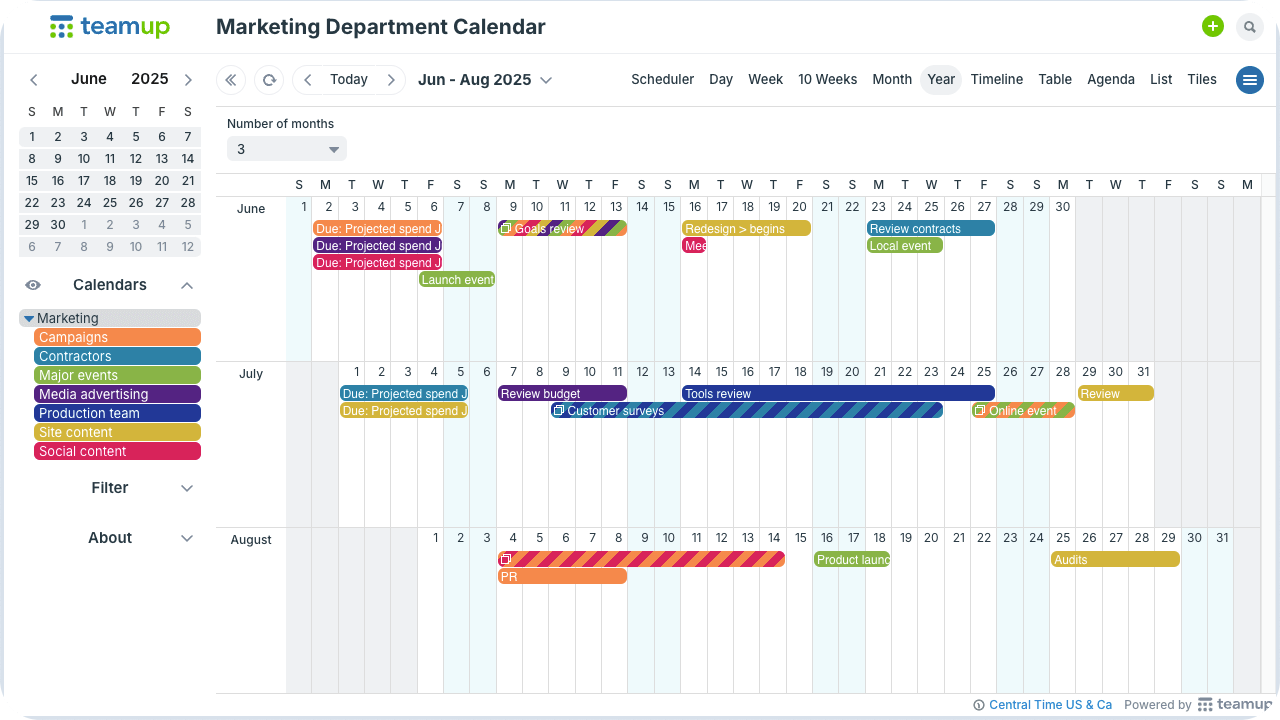
A customizable Year view makes it possible to choose how many months appear and which date range they cover. Instead of a fixed January–December panel, the display can show anywhere from 1 to 12 months at a time, aligned with practical planning periods such as terms, quarters, or project phases.
In Teamup, Year view transforms the calendar into a long-range planning board. Events are visible, anchored to their actual dates with their sub-calendar color-coding, while the view shows the exact multi-month span needed.
Benefits of a flexible Year view for planners
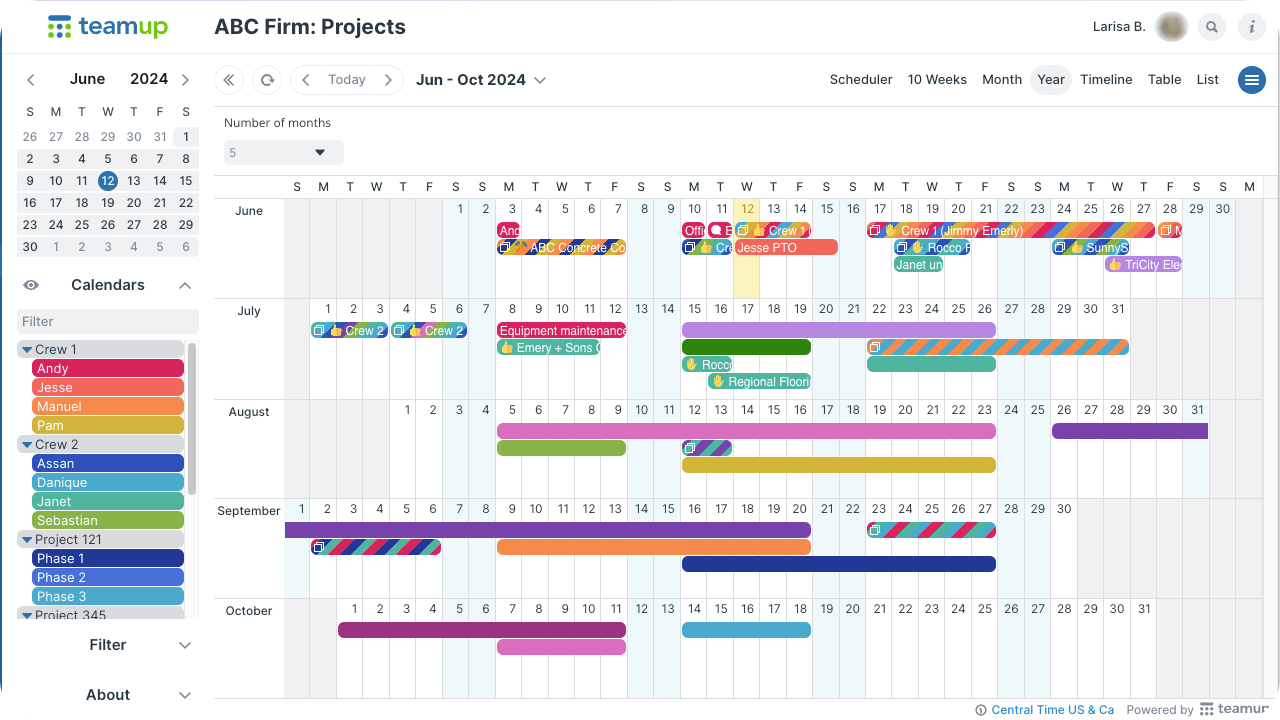
When the calendar aligns with the organization’s planning style, long-term scheduling becomes more efficient. The tool supports the process rather than creating friction.
- Clear timeframe visibility: Quarterly, academic, or other planning periods remain within clean boundaries. Key months appear together on one screen without requiring manual adjustments.
- Early conflict detection: With the right months visible on one screen, potential scheduling conflicts — such as exam periods overlapping with major events — stand out early.
- More accurate workload planning: A multi-month perspective reveals heavier and lighter periods. Launches, deadlines, and maintenance windows can be arranged to balance workloads.
- Less dependence on spreadsheets: Year view provides a comprehensive overview, reducing the need for external spreadsheets, screenshots, or static documents.
- Improved stakeholder visibility: Leadership, faculty, and project sponsors gain a clear understanding of timelines and how events unfold over weeks and months.
- Easy adaptation to change: When terms shift or project timelines move, comparing those changes with other events is easy in Year view.
A better fit for real-world planning cycles
In the real world, planning doesn’t align with the calendar year’s start and end. Different projects, activities, and organizations have their own rhythms. You need a calendar that reflects your real planning phases and cycles, so what you see on the screen matches the way you truly plan.
Related resources
- With Teamup, there are multiple ways to see a whole year on one page
- Plan ahead with calendar visibility for long-term operations
- Do organizational annual planning with Teamup
- More ways to use Teamup for long-term planning
- All about the Year view plus how to quickly reschedule events in Year view
- Get started with this Yearly Planner calendar template
With Teamup, long-range planning can be a clear, visual process that adapts to your needs. Give it a try.
Frequently asked questions
Click a question to see the answer.
Can I start the Year view on any month?
Yes. Navigate to the month you want, and Year view will show the selected number of months starting from there.
Can I show only 3 or 6 months instead of all 12?
Yes. Year view supports 1–12 months. You choose how many months appear to match your planning period.
Will changing the number of months affect my events?
No. It only affects the display. Your events remain untouched.
Can different teams use different Year view settings?
Yes. Each user can adjust the number of months shown when using Year view.
Can I hide certain sub-calendars in Year view?
Yes. Toggle sub-calendars on or off to focus the view.
Can I share a Year view with stakeholders?
Yes. Share a read-only link so stakeholders see the long-range schedule without edits.
Is Year view better than exporting to a spreadsheet?
Often, yes. Year view stays live and updates automatically. Spreadsheets do not.
How does Year view help with workload planning?
A multi-month view makes heavy and light periods obvious so you can spread workload more evenly.