Keeping track of everything happening across your personal life, hobbies, and community groups can quickly get overwhelming. Events live in different places: a club calendar, a volunteer signup page, a school schedule, or a shared family calendar. You might check one and miss another. A single calendar that brings everything together makes it easier to stay informed and plan your time.
The need: Stay updated on personal, hobby, and community events without constantly checking multiple calendars and sources.
The Teamup solution: A unified Teamup calendar that pulls in iCal feeds from different organizations and personal sources, so all events appear in one reliable, always-updated view.
Why this need matters
Think about a typical week for someone involved in multiple activities. You might volunteer at a local shelter, attend a weekly sports league, follow school events for your kids, and stay connected to a neighborhood group.
On Monday morning, you check your email for volunteer updates. Later, you open a separate app to confirm your sports schedule. A reminder about a school event comes through a group message. Somewhere in between, a community event is delayed but you don’t see the change until it is too late.
When event details are spread across different tools and platforms, schedule changes are easy to miss. You end up double-booking yourself or skipping events unintentionally. It’s all one schedule, yours, but keeping everything aligned requires constant checking and rechecking.
You don’t want to miss opportunities, but you need a simpler way to stay organized. Here’s how you can use Teamup to set up one place where everything shows up automatically for easier, coordinated scheduling.
The solution in practice
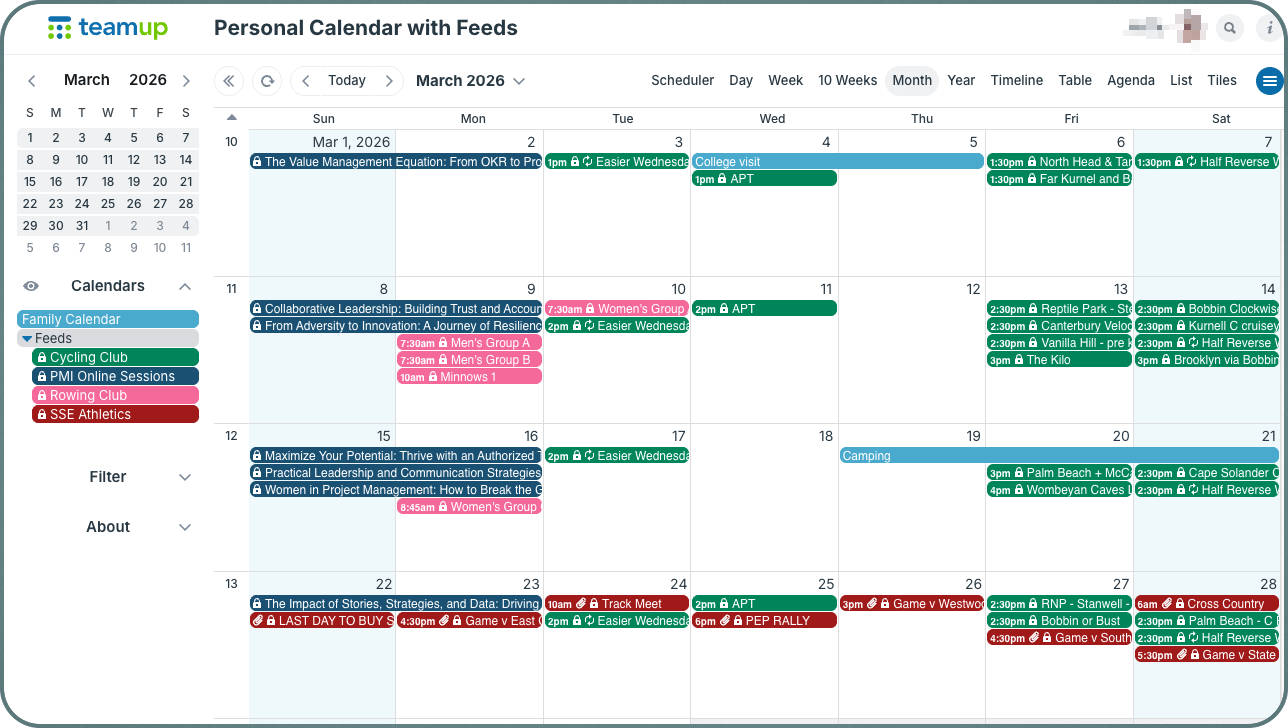
Click to enlarge: Add inbound iCalendar feeds to your personal Teamup calendar to see all the schedules in one place.
With Teamup, you can bring all your calendars together into one unified view by adding inbound iCal feeds from the sources you already use.
🧐 What’s an inbound iCalendar feed?
- An iCalendar feed (also called iCal feed or iCal) lets you set up a one-way sync between calendars.
- The iCalendar format is a standardized data format and is supported by many calendar services.
- With an iCal feed, you can “feed” events from the source calendar to a subscribing calendar automatically.
- The iCal feed comes from the source calendar. An iCal feed URL ends with .ics.
- The subscribing calendar receives the events from the source calendar.
- Inbound iCalendar feeds allow you to view calendars from other calendars or from another Teamup calendar.
Instead of switching between apps or relying on memory, you open one calendar and see everything: volunteer shifts, club events, school activities, and personal plans. Each source can appear as its own color-coded calendar, so you can quickly tell what is what.
When an organization updates its schedule, the change flows into your calendar automatically. There is no need to copy events manually or check for updates. You always have the latest version. Instead of double-checking that you have the latest info or reacting to scattered updates, you can plan ahead with confidence. You can see conflicts early, decide what to attend, and keep your schedule balanced without extra effort.
How to set it up
⚙️ Mini-guide
- Create your own Teamup calendar if you don’t already have one.
- Identify the calendars you rely on, such as volunteer schedules, club events, school calendars, and personal plans.
- Find the iCal feed link from each source. It may be labeled “Subscribe,” “iCal,” or “ICS.” If you can’t find it, request it from the calendar owner/coordinator.
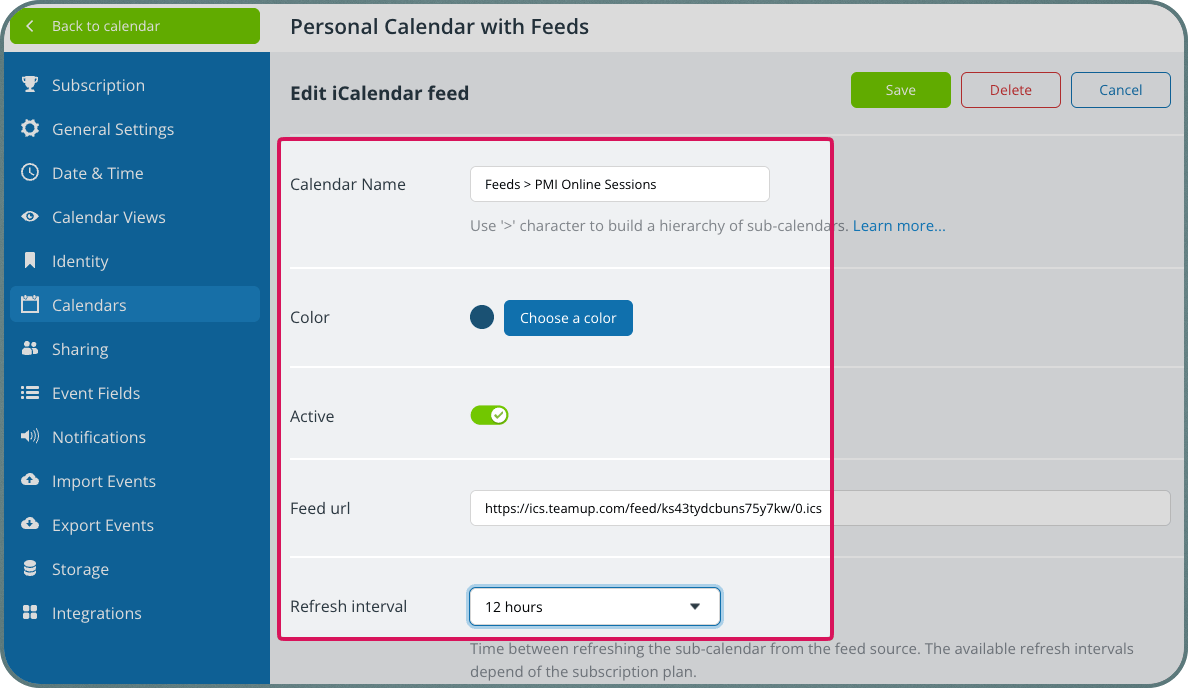
- Follow these steps to add each iCal feed into your Teamup calendar as its own sub-calendar.
- You can assign colors and organize them in folders to keep things neat and clear.

Click to enlarge: Choose a name, a color, and set the refresh interval for each feed.
- Check your Teamup calendar for a complete, up-to-date view of everything that matters for your schedule in one place.
Benefits: a clearer, more manageable schedule
Bringing everything into one calendar has immediate, practical benefits:
- You stop switching between apps and sources.
- Schedule updates appear automatically.
- Conflicts are easy to spot before they become problems.
- You stay engaged with your community without missing events.
The result is a calendar that reflects your real life, not a partial view of it. And when all the schedules that matter to you are visible in one place, staying organized becomes much simpler. You don’t have to chase updates or piece together your week from different sources. Everything is already there, ready to use.
Set up your Teamup calendar and start bringing your schedules together into one clear, reliable view.