Trade shows remain one of the most effective ways for marketing and sales teams to create meaningful connections, accelerate sales conversations, and strengthen brand visibility. They offer something digital channels alone cannot: direct access to decision‑makers, high‑intent interactions, and deeper engagement that often leads to valuable long-term relationships.
Yet despite their potential, trade shows are notoriously difficult to plan and coordinate. Teams juggle spreadsheets, email threads, shared drives, CRMs, and chat channels, each holding only a fragment of the full picture. The result is limited visibility, disjointed workflows, lost information, and inconsistent follow‑up.
Success at a trade show depends on alignment and fast, frictionless information flow. That’s why a centralized, visual calendar needs to become the backbone of your event — from preparation to on‑site coordination to post‑show results.
Pre-show coordination: How Teamup solves the first challenge
The early planning stage is where many teams get overwhelmed: unclear goals, scattered responsibilities, and schedules spread across different tools. Teamup pulls everything together into one organized, visual workspace so your team begins the event fully aligned. The goal is ensuring everyone understands the plan, the message, and their role.
Share goals, priorities and messaging
Define what you want to achieve at the show: Greater visibility, qualified leads, key meetings, or a major announcement. Then set clear priorities so everyone knows what matters most. Once you’ve defined the core message your team should communicate, add this brief — along with any supporting materials such as documents, images, talking points, or links — directly to your Teamup calendar so everyone can reference it easily.
Organize your team in one place
Teamup simplifies coordination by bringing everything into one shared system. Start by setting up a master calendar and carefully structure the sub-calendars to map out the different moving parts of your team at the show, for example, booth staffing, demos, meetings, travel schedules, and each team member’s responsibilities.
Access permissions ensure that each person sees only what’s relevant to them, reducing noise and keeping everyone focused. And with flexible calendar views like Day, Week, Agenda, or Timeline each team member can choose how to display that information, making it easier to work through their tasks while still understanding the overall event plan.
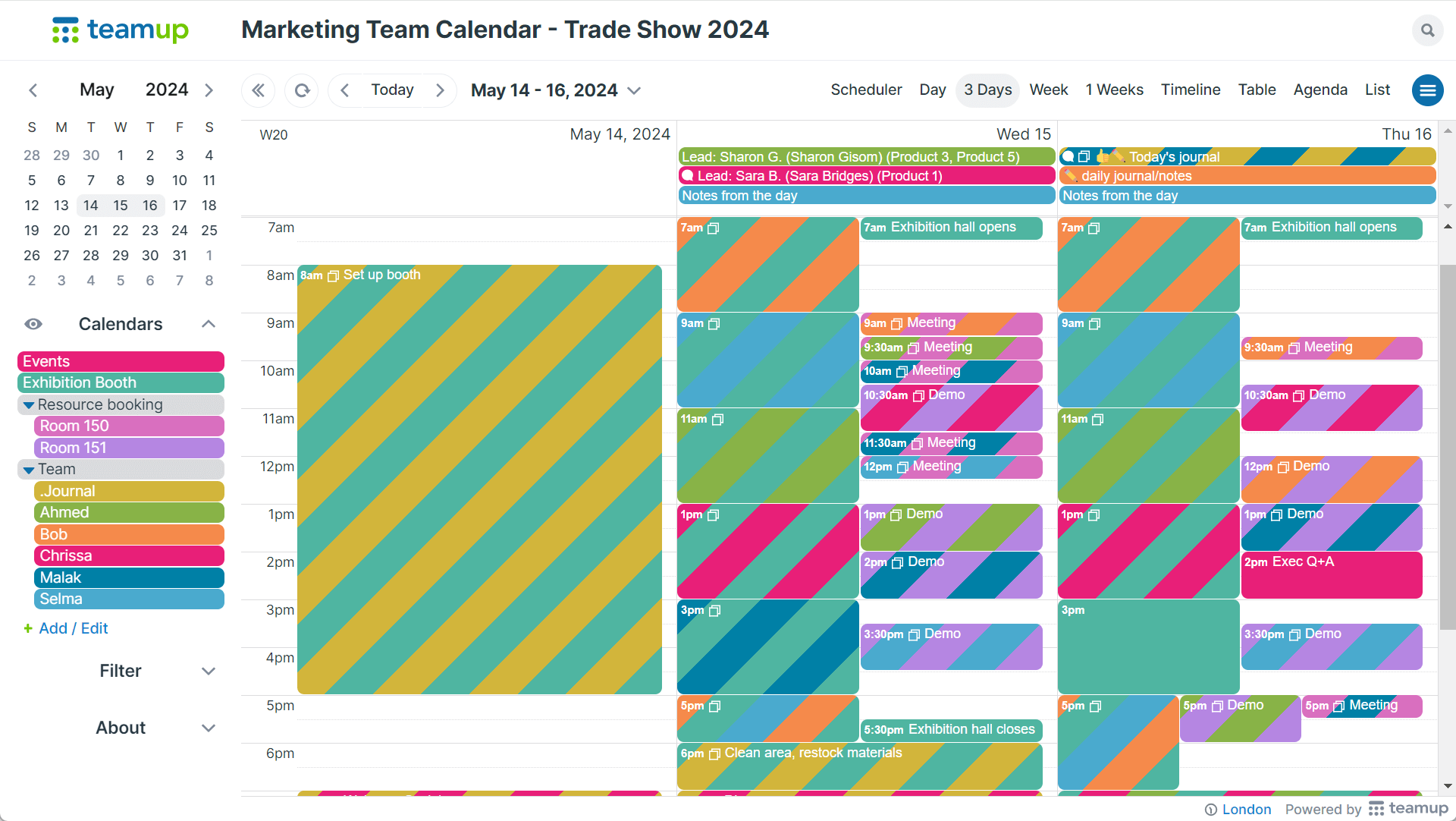
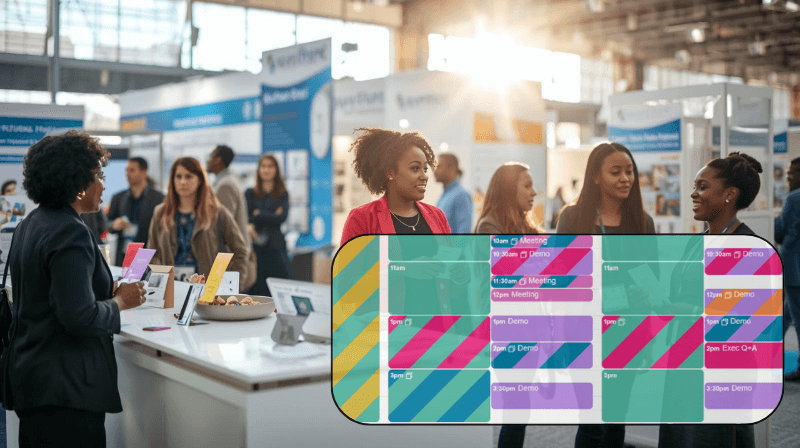
Click to enlarge: A trade show calendar in Teamup, with sub-calendars for booth duties, resource bookings, demos, meetings, and individual team members
You can enhance your master calendar with custom fields, such as task status or standardized lead details. This way, your team can quickly see what’s complete, what’s pending, and which leads require follow-up.
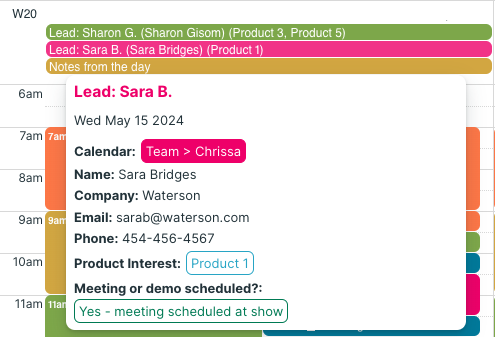
Click to enlarge: A trade show lead entry in Teamup using custom fields “product interest” and “meeting or demo scheduled”
PR teams can also use Teamup to schedule press briefings, interviews, and announcement windows so media activity stays integrated with the overall event plan. With everything in one place, the communications team can coordinate seamlessly with sales, marketing, and product teams on timing and messaging throughout the event.
During the show: Use Teamup as a live information hub
Once the doors open, everything becomes dynamic: schedules shift, meetings are added, leads appear unexpectedly, and team members move constantly. That’s when Teamup becomes the information hub that keeps everyone aligned on the move.
Turn your calendar into a shared workspace
Your calendar shifts from a static plan to an active workspace where your team can:
- Capture leads instantly
- Upload booth photos or any other images
- Add notes from demos and customer interactions
- Schedule on-the-fly meetings or reschedule appointments
- Track what’s happening in real time across the entire team
With Teamup, every update syncs to everyone’s device, keeping your team connected even while they’re spread across the halls.
“We use the Teamup calendar to schedule meetings around a trade show. It has become an invaluable tool because we can check the calendar and schedule meetings right on the show floor. We also love that we can add a Teamup meeting to our Outlook calendar and use it as a meeting invite. It’s become a tool we can’t live without!”
— Sharon F, Marketing Communications Director

Click to enlarge: Individual team members can hide or show sub-calendars in the Teamup app as well, making it easy to focus on their schedule.
Trade shows move fast, and valuable moments can be easy to lose. Encourage your team to capture photos like booth activity, product demos, customer conversations or speaker sessions, and upload them directly to the relevant event in Teamup. This preserves valuable context and makes post-show reporting, content creation, and follow-up much easier.
Plan and promote special marketing events
Trade shows often include more than booth duty and meetings: Many companies host special events to connect with customers, partners, or prospects in a more focused way. These might be private roundtables, VIP dinners, press briefings, or larger social gatherings for hundreds of attendees. Teamup makes planning and promoting these side events simple and efficient.
Create a dedicated event in your Teamup calendar with all the key details:
- Time, location, and agenda
- Hosts and team responsibilities
- Guest list notes or target attendees
- Attachments like menus, speaker bios, or venue maps
You can then publish the event as a Teamup Event Page: a clean, mobile-friendly flyer you can share anywhere, where invitees can sign up directly. You can also share the Event Page on social media to promote your event. If you update the event in the calendar, the Event Page updates automatically, ensuring guests always have up-to-date information.
Post-show: Follow-up & event review
The work doesn’t end when the trade-show floor closes. In many ways, the most valuable phase begins afterward — when leads are followed up, conversations turn into opportunities, and your team evaluates what worked. Teamup helps carry the momentum forward by turning your event calendar into a complete record of what happened and a structured system for next steps.
Turn your calendar into the event record
Throughout the show, your team has captured leads, notes, photos, meeting details, and status updates directly in the calendar. After the event, you can review all leads, open meeting entries with outcomes, access attachments or photos, and see exactly who handled each interaction. Nothing gets lost or needs to be pieced together later.
Enable clear, actionable follow-up workflows
Use Teamup to organize the post-show phase as intentionally as the pre-show:
- Create a dedicated Post-Show Tasks sub-calendar
- Add a Follow-Up Status custom field (e.g., Not Started, In Progress, Completed, Needs Info)
- Schedule follow-up calls, demos, and handoffs
- Assign tasks to the right team members
You can then use built-in filters to see all leads that still require follow-up, leads marked as high priority, meetings that need next steps, tasks still incomplete or awaiting information.
Review, reflect, and prepare for next year
Once follow-up is underway, take a moment to look back at the event. Use your Teamup calendar as a record of what worked, what didn’t, and where bottlenecks appeared. Reviewing peak activity times, scheduling issues, or coordination gaps will give you insight for improving the next show.
When you’re done, archive the calendar and duplicate it as a template for next year. With timelines, roles, leads, materials, and notes stored in one place, your team starts the next cycle more informed and better prepared.
Trade show planning is inherently complex, but it doesn’t have to be overwhelming. When you centralize timelines, responsibilities, assets, and schedules in one flexible, visual system, your marketing team can execute with clarity and confidence — from early planning to post‑show follow‑up.
👉 Create your own calendar in Teamup and start planning your next industry event today.