Running a large restaurant or bar is more than just managing reservations. Managers also handle staff schedules, special events, sports broadcasts, maintenance work, and daily operations. When these details are in different systems or informal notes, conflicts and miscommunication arise. A centralized scheduling system combines everything into one organized calendar. This way, managers and staff can see what’s happening and plan accordingly.
The need: Restaurant and bar managers must coordinate reservations, staff schedules, special events, sports broadcasts, maintenance tasks, and internal operations without creating conflicts across teams and spaces.
The Teamup solution: A structured master calendar with sub-calendars for spaces, event types, and teams, giving supervisors modify access to relevant areas while staff receive read-only or modify-my-events access to keep availability and schedules aligned.
When restaurant schedules live in different places
Picture a bustling downtown bar. It has several spots: the main floor bar, an upstairs lounge, and a recreation room for private events.
During a typical week, managers juggle several plans:
- A live band booked for Friday night upstairs.
- A watch party for a major playoff game on the main floor.
- A private birthday reservation in the recreation room.
- Deep cleaning scheduled for early Monday morning.
- HR training for new bartenders midweek.
If each team tracks its plans separately, problems arise quickly. For example, a private party is booked in a room that’s closed for maintenance. A major sports event is planned without extra staff coverage. These issues aren’t due to carelessness, but the cause major problems during busy operation hours.
Without a shared operational calendar, everyone is working without full visibility. Supervisors end up wasting time chasing updates and resolving conflicts, instead of focusing on service.
A master calendar that reflects how the venue operates
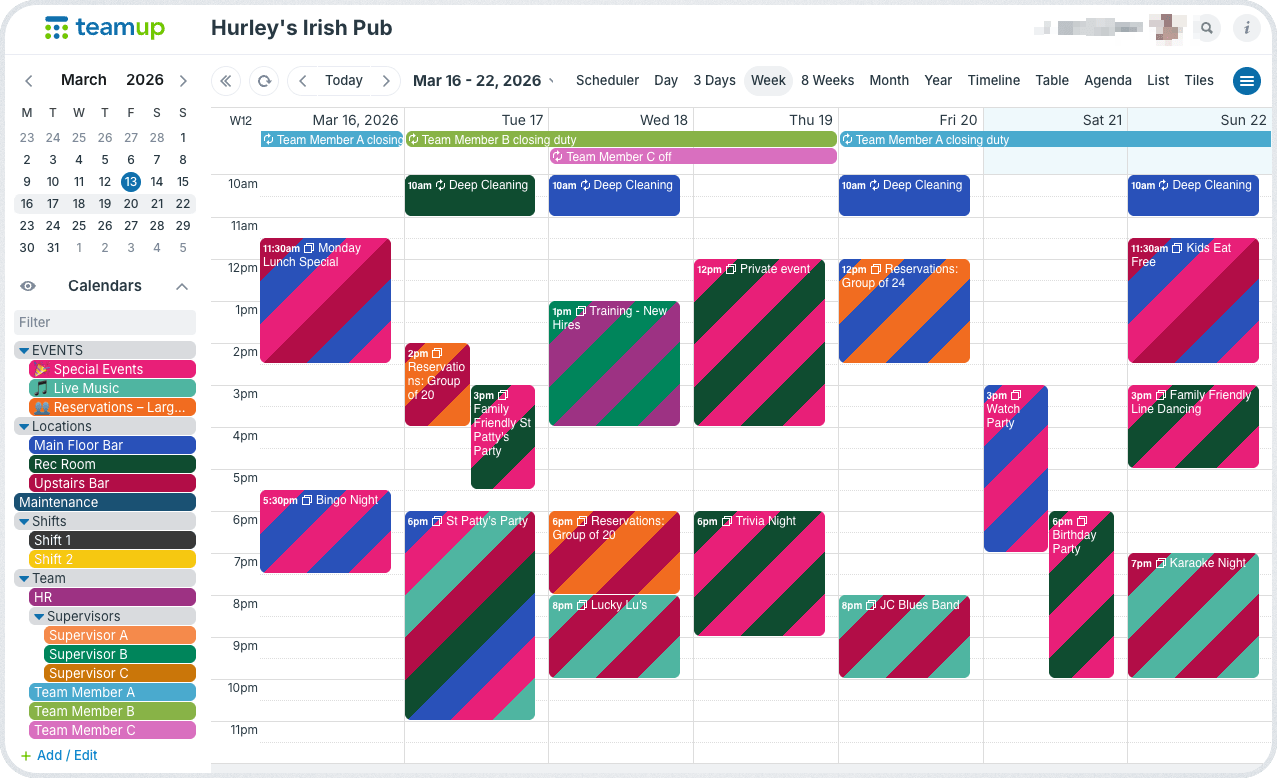
A structured master calendar gives managers a single operational view of everything happening across the restaurant or bar.
Instead of tracking activities in separate systems, the calendar provides an organized space where every scheduling detail lives. From staff members to special events to scheduled maintenance, there’s one place to see what’s happening.
Managers can quickly answer practical questions such as:
- What events are happening tonight in each space?
- Are we adequately staffed for a playoff watch party?
- Is a maintenance task scheduled during service hours?
- Are multiple events competing for the same area?
When everything is visible together, bottlenecks, staffing issues, or event clashes become obvious before they cause problems. And double-bookings can be automatically prevented with a simple calendar setting.
How it works
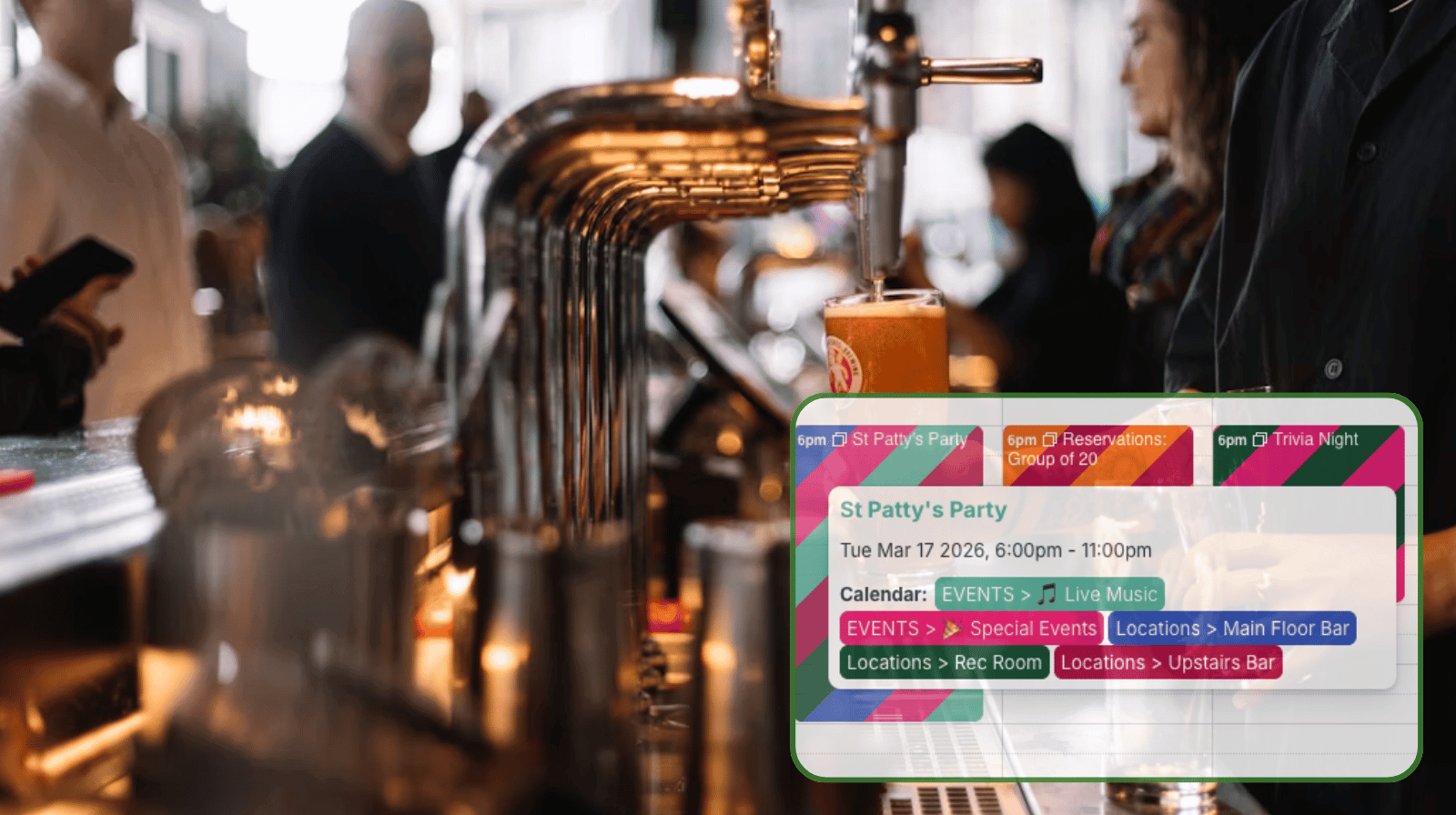
Color-coded categories, organized in folders
- Each distinct area, event type, or person is represented by a color-coded sub-calendar.
- Sub-calendars can be set to prevent overlapping events. This automatically keeps any space or staff member from being double-booked.
- Folders and individual sub-calendars that can be turned on or off for a focused view.
Clear access levels for supervisors and staff
Large venues typically have several supervisors responsible for different parts of operations. A shared calendar works best when access matches those responsibilities:
- General managers receive modify access to all calendars.
- Floor managers or supervisors receive modify access to the spaces or event types they oversee and read-only access to others.
- Staff members receive modify-my-events access to their own assigned sub-calendars to request time off or update their availability. They get read-only access to other calendars so they can see events and schedules clearly.
This structure keeps scheduling controlled while still allowing team members to contribute important information.
Smoother operations on busy nights
When all events and operational tasks live in one shared system, the calendar becomes a practical operations tool instead of just a booking list.
- Staff no longer need to send messages asking, “Can you mark me unavailable next Thursday?” They simply update their own availability.
- Instead of digging through emails or spreadsheets, supervisors can quickly review the next two weeks of events and confirm that everything is prepared.
- Maintenance items or repairs are marked clearly on the calendar. The affected areas are automatically “blocked” so there’s no chance of accidental bookings for a space that isn’t available.
Restaurants and bars are dynamic environments where multiple teams and events overlap every day. A structured master calendar gives managers complete visibility across spaces, staff, and schedules. Instead of reacting to conflicts, they can plan ahead and focus on offering great experiences that keeps people coming back for more.
Give it a try: Create your own Teamup calendar to keep all the details organized in one clear system.
Related resources
- Building a calendar structure to organize complex schedules
- When to use one big master calendar
- Managing staff availability with modify-my-events access
- Use Teamup for complete shift visibility and seasonal staffing plans
- ▶️ Automatically prevent double-booking