Design agencies constantly share work with clients: draft concepts, revised versions, final assets, and launch-ready deliverables. The challenge isn’t just sending files—it’s presenting them clearly so clients can review, compare, and respond easily. A visual calendar can organize design deliverables into a clean, client-friendly layout while keeping internal project coordination separate.
The need: Share design concepts, revisions, and final assets with clients in a way that is visually organized, easy to review, and keeps internal agency workflow private.
The Teamup solution: A shared calendar where design deliverables appear as visual events. Clients receive secure read-only access to a curated calendar view showing concepts, versions, and milestones in an attractive Tiles layout.
Useful for: Design agencies, creative teams, brand studios, account managers, and creative directors who coordinate client deliverables and approvals.
Challenge: Sharing design work for feedback and approval
Client feedback often slows down not because of the design itself, but because of how the work is shared. Design teams might send concepts through email, file-sharing links, messaging apps, or presentation decks. This creates a scattered workflow where no one is fully sure which version is current or where feedback lives.
Common issues include:
- Feedback split across tools: Comments come in through email, chat, and documents, so designers have to piece everything together.
- Version confusion: Clients may review outdated files or miss the latest update entirely.
- Delayed approvals: Teams wait for feedback that gets buried in long threads or overlooked notifications.
- Repeated questions: Clients ask for details that were already shared, but are hard to find again.
A shared, visual calendar creates a single place where each design concept is presented clearly, updates stay organized, and client feedback stays connected to the relevant item.
Solution: A visual calendar for design concepts and approvals
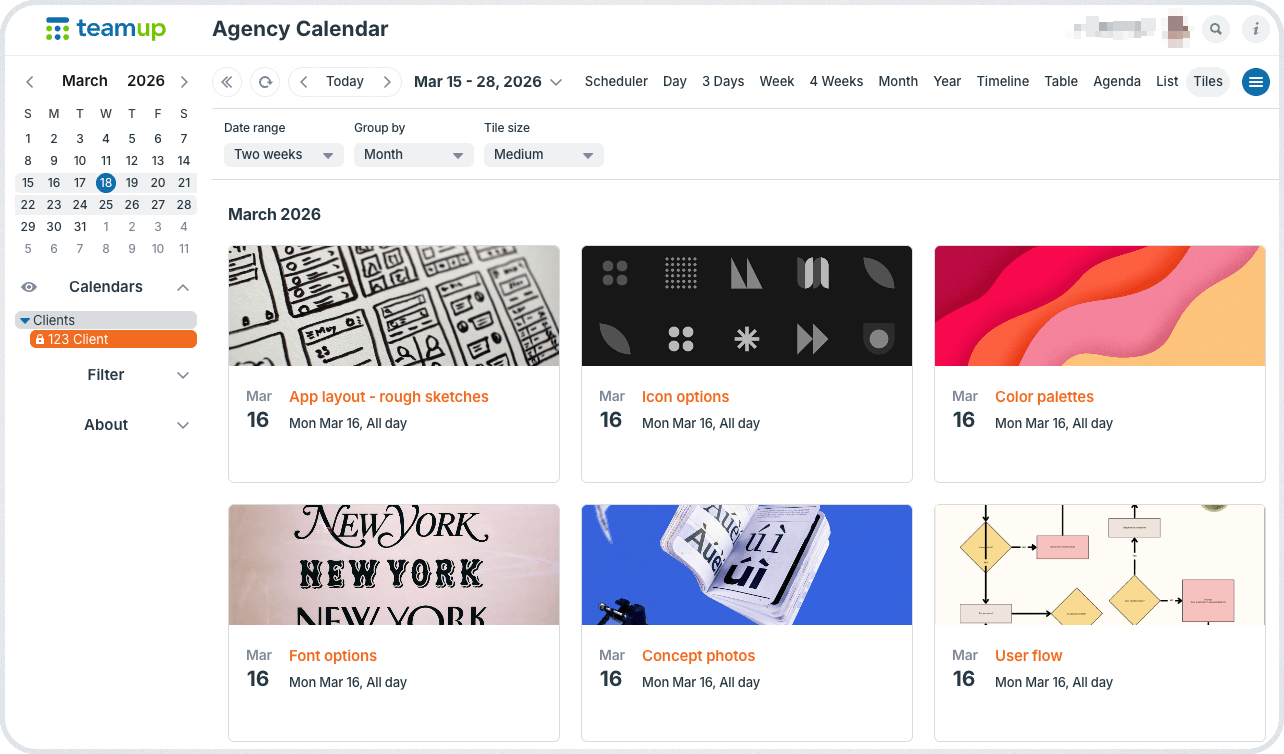
Click to enlarge: Each client gets customized, secure access to view only their items. Comments allow clients to provide feedback, ask questions, or give approval directly on each item.
A shared calendar can act as a structured visual workspace for client-facing deliverables. It’s easy for clients to access (on any browser or in the Teamup app). The visual layout provides immediate clarity about each item, so clients can respond without guesswork. And all the information can be contained in one place, so both clients and agency staff are working from the same material and able to communicate about it in one place.
Customized access for each client
Just like agencies share project timelines safely, they can also structure client-specific access for design deliverables. Each client gets customized access to the calendar. It’s read-only, so they can’t make edits to any event. And their access includes only their assigned sub-calendar, where agency staff can add the design concepts or polished deliverables ready for review.
Other client projects aren’t shared, and internal-only calendars and events are seen only by agency staff.
Visual layout with all the information
Each design concept, version, or asset can be scheduled as a calendar event that includes:
- Image previews or attachments.
- Version labels or milestone markers.
- Notes for client review.
- Links to examples and inspiration.
When clients open the calendar, Tiles view displays each design item as a visual card, creating a clean gallery-style layout. Because Tiles view is available in both the browser and the Teamup mobile app, clients can quickly review designs whether they’re at their desk or on the move.
Feedback and approval directly on the event
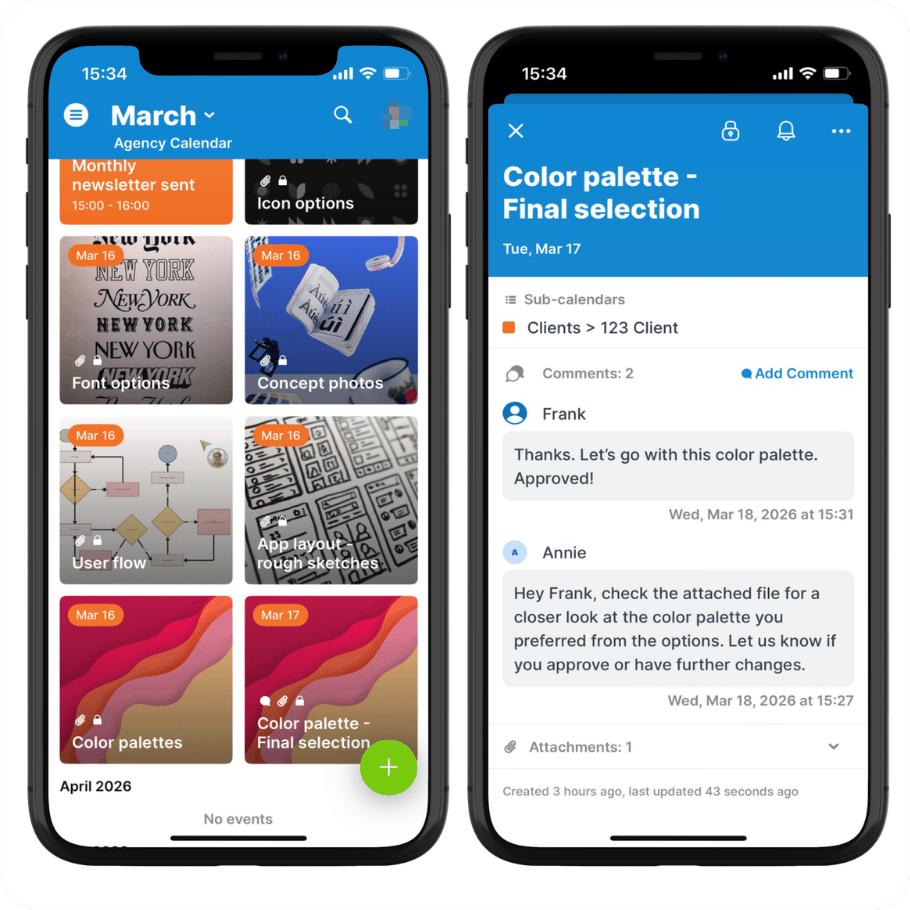
Once design concepts and deliverables are organized in the calendar, clients can respond directly on each item using event comments.
Instead of sending feedback through separate email threads or messaging tools, clients can reply to each concept directly on the relevant event. This keeps questions, feedback, and approvals attached to the exact concept or version being discussed. Each comment appears with a timestamp and the name of the person who posted it, creating a clear record of the review process.
It’s a simpler workflow for feedback and approval. There’s no confusion over which item or version is being discussed. Requests, responses, and approvals stay attached to each design.
Mini-guide
- Create sub-calendars for each client or campaign.
- Enable event comments for all users by default.
- Give each client customized calendar access with read-only permission to their own sub-calendar.
- Add design concepts, drafts, and final assets as calendar events for clients to review and approve.
- Attach preview images, mockup files, and notes to each event.
- Clients can open the calendar on any browser or in the Teamup app:
- Tiles view provides a visual gallery-style layout.
- Event comments makes it simple to ask questions, provide feedback, or give approval.
Results: Clear visual reviews without extra coordination
Clients gain a clean, visual overview of design work as it progresses from concept to final deliverables. Instead of searching through email threads or file links, they can open the calendar and instantly see what’s ready for review.
Because updates appear automatically as the agency schedules new versions or assets, there’s no need to send manual updates or resend files. And there’s no confusion over whether a question was asked, feedback was received, or approval was given: It’s all right there, documented on each event in the time-stamped comments. It’s a streamlined system that provides smoother communication and an easier process for every project.
Create your own agency calendar and set up a visual design review and approval system that makes client work smoother and easier.
Related resources
- Share project timelines with clients while keeping internal work private
- Control what clients can see with customized calendar access
- Attach files, images, and mockups directly to calendar events
- See more about using event comments and previewing attachments on the Teamup app