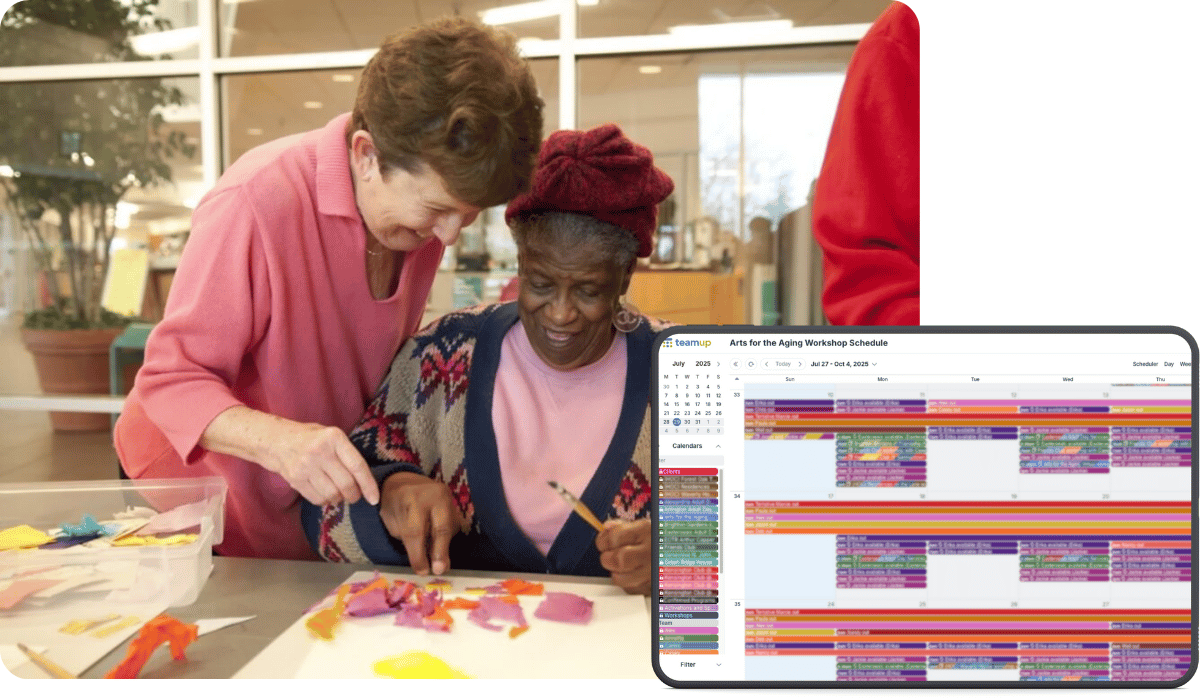
Arts for the Aging (AFTA) is no ordinary nonprofit. For almost 40 years, this nationally recognized organization has served older adults and their caregivers. They do this through arts-based wellness programs led by teaching artists and customized for participants.
About AFTA
- Organization: Arts for the Aging (AFTA)
- Location: Greater Washington, D.C. Area
- Industry: Health Care & Social Assistance / Arts
- Size: Small-to-midsize nonprofit
- Summary: Creative aging and therapeutic art programming specifically for older adults in community and residential care settings
- Key product or service: Artist-led, multidisciplinary, participatory arts workshops (visual, performing, literary, intergenerational) and caregiver/teaching‑artist training. Delivery includes in-person and virtual workshops, caregiver sessions, kits, hybrid programs, ensembles, and more.
Challenge: One schedule doesn’t fit all
Our teaching artists and clients use a wide variety of calendars, including but not limited to Outlook, Google Calendar, Apple Calendar, Asana, and paper calendars. Some clients and teaching artists have Windows PCs and some use Apple products. Some use only mobile devices or tablets, and some have more sophisticated computer systems. …when we share calendar events and scheduling materials with our teaching artists and clients they need to be compatible with any system that the recipient may rely on.
— Kayla Lemen-Conklin, Program and Communications Coordinator
To provide personalized programs, AFTA works with multiple care providers, considers varying participant needs, and aligns schedules with teaching artists and community partners. Coordinating and communicating with this many people across multiple organizations is not simple. Most software assumes conformity. AFTA needs flexibility.
Scheduling factors
- Diverse user base (artists, caregivers, program staff)
- Incompatible calendar systems (Google, Outlook, iCal, paper)
- Constant need for flexibility and real-time updates
- Each program tailored to a unique audience and setting
- Coordination needed across multiple locations
Each artist has their own availability, preferred workflow, and tools. Each partner organization and community AFTA serves has different logistical requirements, expectations, and rhythms.
Standard scheduling tools are designed for internal teams using the same systems. In this scenario, they simply don’t work.
Solution: Adaptable features bridge the gap
Teamup is the only tool that works for us because customization is core to our work. We personalize our program content to each community of older adults and caregivers, and we tailor our workshop schedules to each teaching artist’s individual needs. Most scheduling software does not work for us because our clients and teaching artists use a wide variety of calendars and operating systems. We love Teamup because it helps us bridge the gap between different communication and organization styles.
Teamup provides a unique combination of customization, power, and simplicity. It’s a tool designed for groups, and flexibility is part of the design. For AFTA, Teamup provides the right combination of structured scheduling and adaptable configuration:
- Secure, customized access for individuals and groups.
- Centrally managed, customized access with granular permission control. Each person sees just what they need, and the admin can adjust access for any individual or group at any time.
- Flexible calendar structure that can scale as the organization adds new offers, artists, and partners.
- Color-coded sub-calendars can be organized in folders. It’s easy to add new sub-calendars when needed, without disrupting the existing structure. No strict, predetermined layouts that don’t match AFTA’s needs.
- Configurable event fields and custom fields can track specific program needs, location info, or required materials. Visibility control lets the admin determine which fields are visible to all users.
- One source of truth for all scheduling information and updates, secure and accessible for all stakeholders.
- Easy integration with other tools plus customized embedding options so events can be displayed in way that works for all participants.
- Real-time updates keep event info synced and accessible from any device, with no need to provide multiple updates across different platforms.
- Customized notifications provide relevant info to each stakeholder without a flood of unnecessary notifications.
Results: Flexibility that supports the mission
With a Business level subscription, I will be able to make a sub-calendars for each individual client and teaching artist, then I plan to share change-notifications with them so they get automatic push notifications when their workshops are updated or rescheduled. This will greatly increase our small non-profit’s capacity, saving me about 160 hours per year of manual schedule processing. We also hope it will reduce the number of no-show workshops, as we plan to use Teamup to sync our stakeholders’ schedules and ensure people show up at the right time, every time.
With Teamup, Arts for the Aging can now manage a highly dynamic schedule while giving their artists and communities the clarity and flexibility they need. No more juggling incompatible platforms. No more confusion over time slots, locations, or who’s doing what. With the hours saved, they can focus on crafting new opportunities and connections to foster creative, healthy aging.
Key takeaways
- If your organization works with external partners or contractors, rigid tools will limit your efficiency.
- Relying on manual updates and “standard” communication tools can create a huge administrative workload.
- Communication and coordination improve when people can access just the information they need, in the format that works best for them.
- Flexible tools, like Teamup, provide customized structure that adapts and scales with your organization’s needs.
For organizations that work with multiple stakeholders and manage complex scheduling requirements, Teamup may be just what you need. Like Arts for the Aging, you don’t have to force your people into one rigid structure. Find out more about Teamup’s powerful features and flexible structure.